Chart position — tracked daily by LaunchShots
Screenshot style breakdown
Sampled from 6 of 掌中鲸's App Store screenshots — background, accent and theme, measured by LaunchShots (not something Apple publishes).
#FCFCFC bg
#DDDDDD
#2C5CC4 accent
#111111 text
Reading the caption text from the screenshots in your browser…
Screenshots



Icon palette
About this app
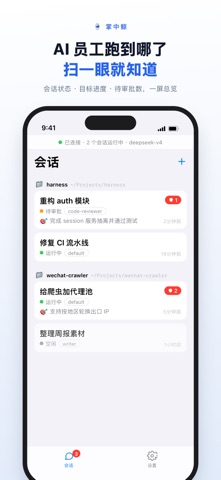
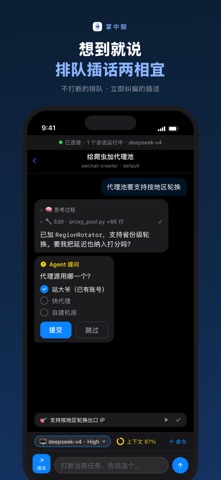
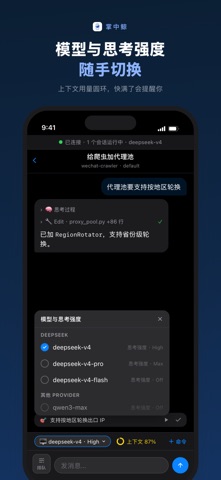
**掌中鲸**(DSH Remote)让你用 iPhone 实时查看和控制运行在 电脑 上的 DeepSeek Harness(DSH)AI 代理——开会、通勤、躺床上,随时掌握 AI 工作进度。 **核心功能:** - **会话随时掌控**:浏览完整对话历史,实时跟进 AI 执行进度,随时发送消息或中断任务 - **审批中心**:AI 请求执行工具操作时,在手机上点一下即可批准或拒绝;需要提问时即时回答 - **目标看板**:创建、暂停、恢复、完成 AI 任务目标,进度一目了然 - **后台任务**:查看 workflow、子代理等任务的运行状态与输出 - **扫码配对,零配置**:电脑 伴侣 App 显示二维码,iPhone 扫码即连,无需手动输入任何地址或密钥 - **实时通知**:审批请求、提问、报错第一时间推送 **安全设计:** 配对密钥仅保存在本地,通信全程 Token 认证,电脑 上的 DSH 端口不暴露给局域网。
App details
What you can learn from 掌中鲸
Every shipping app on the App Store has gone through the same decisions you're working through right now: which screenshot goes first, what caption sits over it, which device frame to show, what color the background should be. The 6 screenshots above are 掌中鲸's answers to those questions — they're public, they're real, and they made it through Apple's review.
What the numbers say: 掌中鲸 runs a mixed light-and-dark set where the background shifts from screenshot to screenshot (first shot #FCFCFC) — each image has to stand on its own, so the captions carry more of the story. The accent colour we picked up, #2C5CC4, is the one to reuse for badges, arrows and highlighted words if you borrow this look. Hit Use this style to open the editor with these exact colours and drop your own screenshot in.
Notice the first screenshot in particular. It's the one users see in search results and on the product page, and it's where most apps spend their best caption and tightest design. Look at the proportion of background to phone, where the text sits, what one thing the image is trying to communicate.
Want to see how other Developer Tools apps approach the same problem? Browse more Developer Tools apps in the showcase.
Take what works into your own screenshots
Open LaunchShots and design your App Store & Google Play screenshots — pick a device frame, drop captions, ship in minutes. Free, in your browser.
Open the screenshot editor →Apps with a similar look
Closest background + accent colours among the listings we've analysed — useful when you want to see the same palette handled by a different team.