Chart position — tracked daily by LaunchShots
Screenshot style breakdown
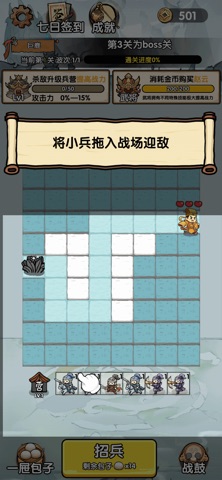
Sampled from 6 of 阿斗我扶你's App Store screenshots — background, accent and theme, measured by LaunchShots (not something Apple publishes).
#545C5C bg
#6B7272
#F4DC34 accent
#FFFFFF text
Screenshots




Icon palette
About this app
烽烟乱世,蜀道艰险。一场护主突围的三国阵地坚守征程已然启程。化身乱世军师,排兵布阵,募兵安营,护送阿斗冲破重重围困,脱离险境。 本作传承阵地坚守策略玩法,带来沉浸式三国守城突围体验。你可自由招揽精锐将士,组建专属强军。长枪骑兵冲锋陷阵,炮兵远程轰击破敌,弓弩手精准狙击,刀兵固守防线。多兵种巧妙搭配、灵活布防,便可抵挡蜂拥而至的敌军,打通突围之路。 善用战场道具,扭转瞬息战局。战地包子补给兵力、安定军心;震天战鼓擂响,便可激发全军斗志,大幅提升战力,助将士奋勇破敌。每一次击败敌军,都能升级兵营实力,解锁更强战力。你还可消耗金币征召五虎上将,凭盖世神威坐镇沙场,扫清阻碍,为阿斗的突围之路保驾护航。 多重难度随心选择,兼顾休闲与硬核策略。普通模式适合新手入门,轻松上手尽享布阵突围乐趣;进阶模式考验战术谋略,满足策略爱好者;地狱模式强敌压境、险象环生,等你来挑战极限。 运筹帷幄,布阵护主。凭谋略击退万敌,护少主平安归途。即刻入局,号令三军,护送阿斗杀出乱世烽烟。
App details
What you can learn from 阿斗我扶你
Every shipping app on the App Store has gone through the same decisions you're working through right now: which screenshot goes first, what caption sits over it, which device frame to show, what color the background should be. The 6 screenshots above are 阿斗我扶你's answers to those questions — they're public, they're real, and they made it through Apple's review.
What the numbers say: 阿斗我扶你 runs a mixed light-and-dark set where the background shifts from screenshot to screenshot (first shot #545C5C) — each image has to stand on its own, so the captions carry more of the story. The accent colour we picked up, #F4DC34, is the one to reuse for badges, arrows and highlighted words if you borrow this look. Hit Use this style to open the editor with these exact colours and drop your own screenshot in.
Notice the first screenshot in particular. It's the one users see in search results and on the product page, and it's where most apps spend their best caption and tightest design. Look at the proportion of background to phone, where the text sits, what one thing the image is trying to communicate.
Want to see how other Games apps approach the same problem? Browse more Games apps in the showcase.
Take what works into your own screenshots
Open LaunchShots and design your App Store & Google Play screenshots — pick a device frame, drop captions, ship in minutes. Free, in your browser.
Open the screenshot editor →Apps with a similar look
Closest background + accent colours among the listings we've analysed — useful when you want to see the same palette handled by a different team.