Screenshot changes — detected by LaunchShots
Screenshot style breakdown
Sampled from 6 of Lockeigo's App Store screenshots — background, accent and theme, measured by LaunchShots (not something Apple publishes).
#5C5C5C bg
#727272
#FCC444 accent
#FFFFFF text
Reading the caption text from the screenshots in your browser…
Screenshots



Icon palette
About this app
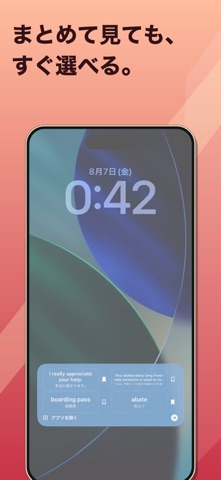
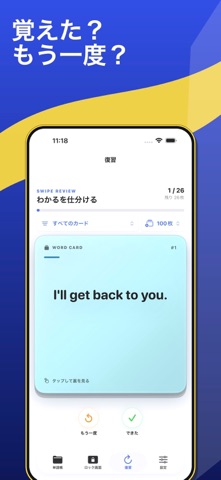
Lockeigo(ロックエイゴ)は、覚えたい英語表現をロック画面で思い出すためのiPhone単語帳です。 主な機能 ・英語、意味、例文をカードとして登録 ・単語、意味、例文をすばやく検索 ・フォルダ整理、JSONの書き出しと読み込み ・1〜4枚のカードをLive ActivityやWidgetに表示 ・「もう一度」「できた」で復習を仕分け ・テーマ、書体、文字サイズ、表示方法を変更 ・任意の復習リマインダー Lockeigo Plusでは、カード上限の解除、階層フォルダ、追加テーマ・書体・カスタムカラー、長い復習セッション、詳細分析、カスタム通知を利用できます。月額と年額は同じPlus機能を提供し、購入確認画面に価格、期間、対象者の無料トライアル条件が表示されます。サブスクリプションは期間終了の24時間前までに解約しない限り自動更新され、Apple Account設定から管理できます。 アカウントやクラウド同期は不要です。カードと学習履歴は端末に保存されます。ロック画面表示を明示的に開始した場合のみ、Live Activityに必要な教材、表示設定、ActivityKit token、App Att…
App details
What you can learn from Lockeigo
Every shipping app on the App Store has gone through the same decisions you're working through right now: which screenshot goes first, what caption sits over it, which device frame to show, what color the background should be. The 8 screenshots above are Lockeigo's answers to those questions — they're public, they're real, and they made it through Apple's review.
What the numbers say: Lockeigo runs a mixed light-and-dark set where the background shifts from screenshot to screenshot (first shot #5C5C5C) — each image has to stand on its own, so the captions carry more of the story. The accent colour we picked up, #FCC444, is the one to reuse for badges, arrows and highlighted words if you borrow this look. Hit Use this style to open the editor with these exact colours and drop your own screenshot in.
Notice the first screenshot in particular. It's the one users see in search results and on the product page, and it's where most apps spend their best caption and tightest design. Look at the proportion of background to phone, where the text sits, what one thing the image is trying to communicate.
Want to see how other Education apps approach the same problem? Browse more Education apps in the showcase.
Take what works into your own screenshots
Open LaunchShots and design your App Store & Google Play screenshots — pick a device frame, drop captions, ship in minutes. Free, in your browser.
Open the screenshot editor →Apps with a similar look
Closest background + accent colours among the listings we've analysed — useful when you want to see the same palette handled by a different team.