Screenshot style breakdown
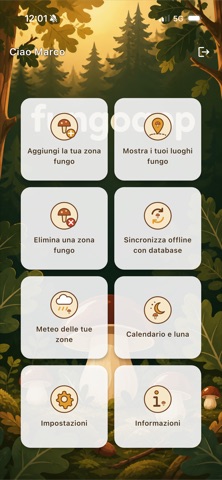
Sampled from 6 of FungoApp's App Store screenshots — background, accent and theme, measured by LaunchShots (not something Apple publishes).
#142414 bg
#344234
#F4CC6C accent
#FFFFFF text
Reading the caption text from the screenshots in your browser…
Screenshots


Icon palette
About this app
FungoApp è l'app per chi va a funghi e vuole ritrovare i propri posti, stagione dopo stagione. Salvi le tue zone sulla mappa, le ritrovi con la bussola e sai sempre se ha piovuto abbastanza per tornarci. Pensata per il bosco: funziona anche senza connessione. LE TUE ZONE FUNGO Segna sulla mappa i punti dove hai trovato funghi, con il tipo (porcino, finferlo, ovolo, chiodino e molti altri), un nome e una descrizione. Le zone sono private: le vedi solo tu. MAPPE OFFLINE DI ITALIA E SVIZZERA Al primo avvio scarichi il pacchetto mappe (circa 2 GB) e da quel momento la mappa topografica con curve di livello e sentieri funziona anche dove non c'è segnale. Puoi ruotare la mappa nella direzione in cui sei rivolto, come una bussola. BUSSOLA VERSO LA ZONA Scegli una zona e l'app ti mostra distanza e direzione, aggiornate in tempo reale, fino ad arrivarci. METEO DELLE TUE ZONE Per ogni zona v…
App details
What you can learn from FungoApp
Every shipping app on the App Store has gone through the same decisions you're working through right now: which screenshot goes first, what caption sits over it, which device frame to show, what color the background should be. The 6 screenshots above are FungoApp's answers to those questions — they're public, they're real, and they made it through Apple's review.
What the numbers say: FungoApp runs a mixed light-and-dark set where the background shifts from screenshot to screenshot (first shot #142414) — each image has to stand on its own, so the captions carry more of the story. The accent colour we picked up, #F4CC6C, is the one to reuse for badges, arrows and highlighted words if you borrow this look. Hit Use this style to open the editor with these exact colours and drop your own screenshot in.
Notice the first screenshot in particular. It's the one users see in search results and on the product page, and it's where most apps spend their best caption and tightest design. Look at the proportion of background to phone, where the text sits, what one thing the image is trying to communicate.
Want to see how other Navigation apps approach the same problem? Browse more Navigation apps in the showcase.
Take what works into your own screenshots
Open LaunchShots and design your App Store & Google Play screenshots — pick a device frame, drop captions, ship in minutes. Free, in your browser.
Open the screenshot editor →Apps with a similar look
Closest background + accent colours among the listings we've analysed — useful when you want to see the same palette handled by a different team.