Chart position — tracked daily by LaunchShots
Screenshot style breakdown
Sampled from 6 of Memora X 世界史一問一答's App Store screenshots — background, accent and theme, measured by LaunchShots (not something Apple publishes).
#ECE4D4 bg
#CFC8BA
#242C5C accent
#111111 text
Screenshots




iPad screenshots




Icon palette
About this app
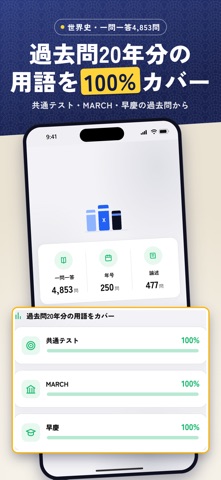
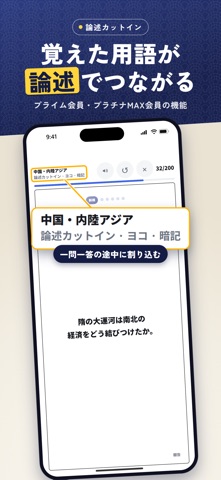
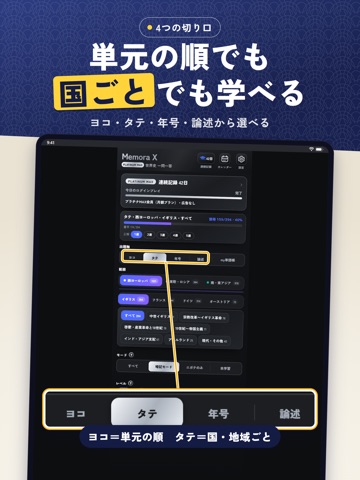
■ 過去問20年分の用語をカバー Memora Xは、大学受験のための世界史の一問一答アプリです。共通テスト・MARCH・早稲田・慶應の過去問20年分を調べ、出題された用語を集めました。 ・一問一答4,853問/年号250問/論述477問 ・共通テスト・MARCH・早慶の過去問20年分に出た用語を100%カバー ・難しさは3段階。レベルを選んで学べます ■ ヨコ・タテ・年号・論述の4つの切り口 ・ヨコ:単元の順に、通して学ぶ ・タテ:国・地域ごとに、つなげて学ぶ ・年号:出来事と年代をセットで ・論述:設問50字・解答80字の短い論述。模範解答の採点キーワードをタップして自己採点 ■ 覚えた用語がつながる「論述カットイン」 関連する用語を覚えると、それらをつなぐ短い論述問題が学習の途中に割り込みます。用語を点ではなく流れで覚えられます(論述カットインは、プライム会員・プラチナMAX会員の機能です)。 ■ 忘れる前に、もう一度 今日覚えたことの7割は、明日には忘れています。Memora Xは忘れることを前提に設計されています。 ・忘却曲線に合わせて、忘れそうなタ…
App details
What you can learn from Memora X 世界史一問一答
Every shipping app on the App Store has gone through the same decisions you're working through right now: which screenshot goes first, what caption sits over it, which device frame to show, what color the background should be. The 19 screenshots above are Memora X 世界史一問一答's answers to those questions — they're public, they're real, and they made it through Apple's review.
What the numbers say: Memora X 世界史一問一答 runs a light set where the background shifts from screenshot to screenshot (first shot #ECE4D4) — each image has to stand on its own, so the captions carry more of the story. The accent colour we picked up, #242C5C, is the one to reuse for badges, arrows and highlighted words if you borrow this look. Hit Use this style to open the editor with these exact colours and drop your own screenshot in.
Notice the first screenshot in particular. It's the one users see in search results and on the product page, and it's where most apps spend their best caption and tightest design. Look at the proportion of background to phone, where the text sits, what one thing the image is trying to communicate.
Want to see how other Education apps approach the same problem? Browse more Education apps in the showcase.
Take what works into your own screenshots
Open LaunchShots and design your App Store & Google Play screenshots — pick a device frame, drop captions, ship in minutes. Free, in your browser.
Open the screenshot editor →Apps with a similar look
Closest background + accent colours among the listings we've analysed — useful when you want to see the same palette handled by a different team.