Screenshot style breakdown
Sampled from 6 of CaseX(ケースエックス)| スマホの中の事件's App Store screenshots — background, accent and theme, measured by LaunchShots (not something Apple publishes).
#140C0C bg
#342E2E
#F4BC5C accent
#FFFFFF text
Reading the caption text from the screenshots in your browser…
Screenshots


Icon palette
About this app
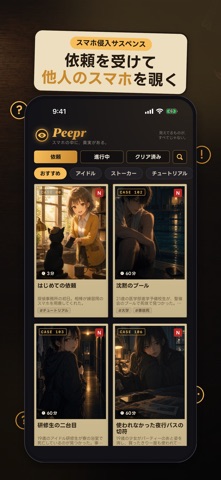
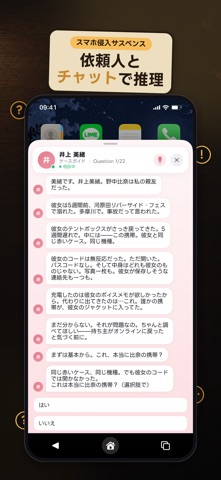
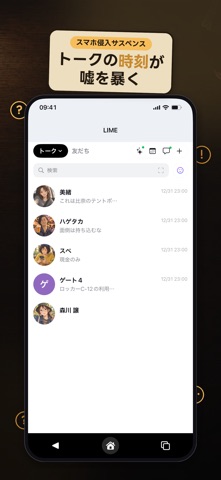
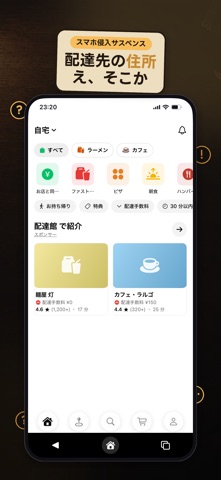
他人のスマホを調べて、嘘を見つける。 「木曜の夜だけ、彼が消える」 「行方不明の妹の名義で、毎晩デリバリーが届く」 「死んだはずの親友から、返事が来る」 依頼人から届くのは、調査対象の "架空のスマホ"。トーク、写真、SNS、決済、位置の記録、配達履歴、交通系 IC まで。 ひとつずつ見ると弱い記録が、"線" になったとき、最初に信じていたことがくつがえる。 これはフィクションのミステリーゲームです。登場人物・会話・データはすべて架空です。 ■ 遊び方 1. 依頼人から事情を聞く 2. 預かったスマホを開く (演出です) 3. アプリを自由に調べる 4. 依頼人の質問に、見つけた事実をひと言で答える 5. 1 本 20 問。全部つながったとき、真相へ ■ 特徴 ・本物そっくりの架空アプリを多数収録 (トーク / 写真 SNS / 動画 / 地図 / 決済 / 交通系 IC / 配達 / ブラウザ / 設定 …) ・行き詰まったらヒント。答えの表記ゆれにも寛容 ・新しい事件や、途中の事件を、通知とロック画面 (Live Activity) でお知らせ ・1 話 10〜20 分。ログイン不要 ■ 無料で…
App details
What you can learn from CaseX(ケースエックス)| スマホの中の事件
Every shipping app on the App Store has gone through the same decisions you're working through right now: which screenshot goes first, what caption sits over it, which device frame to show, what color the background should be. The 6 screenshots above are CaseX(ケースエックス)| スマホの中の事件's answers to those questions — they're public, they're real, and they made it through Apple's review.
What the numbers say: CaseX(ケースエックス)| スマホの中の事件 runs a dark set with one background colour (#140C0C) carried across every screenshot — the listing reads as a single poster when the shots sit side by side in search results. The accent colour we picked up, #F4BC5C, is the one to reuse for badges, arrows and highlighted words if you borrow this look. Hit Use this style to open the editor with these exact colours and drop your own screenshot in.
Notice the first screenshot in particular. It's the one users see in search results and on the product page, and it's where most apps spend their best caption and tightest design. Look at the proportion of background to phone, where the text sits, what one thing the image is trying to communicate.
Want to see how other Games apps approach the same problem? Browse more Games apps in the showcase.
Take what works into your own screenshots
Open LaunchShots and design your App Store & Google Play screenshots — pick a device frame, drop captions, ship in minutes. Free, in your browser.
Open the screenshot editor →Apps with a similar look
Closest background + accent colours among the listings we've analysed — useful when you want to see the same palette handled by a different team.