Chart position — tracked daily by LaunchShots
Screenshot style breakdown
Sampled from 4 of Smile Code - 高颜值随身vibe coding's App Store screenshots — background, accent and theme, measured by LaunchShots (not something Apple publishes).
#F4F4F4 bg
#D6D6D6
#3C3C74 accent
#111111 text
Reading the caption text from the screenshots in your browser…
Screenshots


Icon palette
About this app
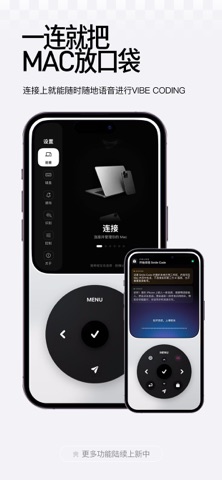
想法还在继续,你却已经不想坐在电脑前了。 ——·—————— Agent 还在跑任务。 刚刚想到的修改,想马上告诉它。 几个项目同时进行,又得来回找会话。 Smile Code,就是为这些时刻而做。 连接你自己的 Mac,把 Agent 会话带到 iPhone 上。 在同一个局域网里,换个舒服的位置,继续你的 Vibe Coding。 ——·—————— ▸ 好看,是每天都想打开的理由 Smile Code 的开发者,首先是一名设计师。 黑色背景、铝合金质感。 像拿着一件熟悉的小设备,而不只是打开另一个聊天窗口。 转动圆盘,浏览会话。 按下确认,进入任务。 声音和触感,跟着每一步操作轻轻回应。 查看进度、切换会话这些小事,也可以很好玩。 ▸ 想到什么,就说出来 “这里留白再多一点。” “按钮再大一些。” “先把这个问题修好。” 不必先在手机键盘上打出一大段话。 用语音说出想法,转成文字,检查后再发送。 个人词库与可编辑词汇包,帮你照顾那些不容易识别的技术名词。 也可以下载本地语音模型,或自行配置 AI 润色服务,让输入更贴合你的习惯。 灵感来的时候,少一点输入的负担。 ▸ 所有已连接会话,放…
App details
What you can learn from Smile Code - 高颜值随身vibe coding
Every shipping app on the App Store has gone through the same decisions you're working through right now: which screenshot goes first, what caption sits over it, which device frame to show, what color the background should be. The 4 screenshots above are Smile Code - 高颜值随身vibe coding's answers to those questions — they're public, they're real, and they made it through Apple's review.
What the numbers say: Smile Code - 高颜值随身vibe coding runs a light set with one background colour (#F4F4F4) carried across every screenshot — the listing reads as a single poster when the shots sit side by side in search results. The accent colour we picked up, #3C3C74, is the one to reuse for badges, arrows and highlighted words if you borrow this look. Hit Use this style to open the editor with these exact colours and drop your own screenshot in.
Notice the first screenshot in particular. It's the one users see in search results and on the product page, and it's where most apps spend their best caption and tightest design. Look at the proportion of background to phone, where the text sits, what one thing the image is trying to communicate.
Want to see how other Developer Tools apps approach the same problem? Browse more Developer Tools apps in the showcase.
Take what works into your own screenshots
Open LaunchShots and design your App Store & Google Play screenshots — pick a device frame, drop captions, ship in minutes. Free, in your browser.
Open the screenshot editor →Apps with a similar look
Closest background + accent colours among the listings we've analysed — useful when you want to see the same palette handled by a different team.