Chart position — tracked daily by LaunchShots
Screenshot style breakdown
Sampled from 5 of ponkan 面白い英和辞典's App Store screenshots — background, accent and theme, measured by LaunchShots (not something Apple publishes).
#FCFCFC bg
#DDDDDD
#F47C1C accent
#111111 text
Reading the caption text from the screenshots in your browser…
Screenshots


Icon palette
About this app
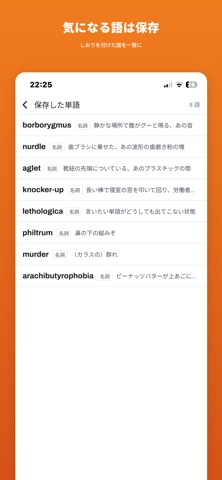
一生使う場面が来ない英単語だけを集めた、英和辞典です。 収録は858語。すべて辞書に実在します。 petrichor ― 長い晴天のあと、最初の雨が乾いた地面に落ちたときの匂い borborygmus ― 静かな場所で腹が鳴る、あの音 arachibutyrophobia ― ピーナッツバターが上あごに貼りつくことへの恐怖 aglet ― 靴紐の先端についている、あのプラスチックの筒 lanterne rouge ― 自転車の長距離大会を完走した選手のうち、最下位の人 一語も創作していません。綴りも語形も辞書の見出しに合わせました。 収録の基準は、語の難しさではなく、使う日が来ないことです。 ■ 引く ・858語をアルファベット順に。英単語・品詞・意味が一覧で読めます ・英単語でも、日本語の意味からでも検索できます ・単語を開くと、挿絵・発音記号・読み上げ・例文つき ■ 遊ぶ ・858語からランダムに出る四択クイズ(1回10問) ・気になった語はしおりを付けて保存。自分だけの一覧になります ■ 料金 すべての単語を無料で引けます。 広告を消したい方は「広告削除」(買い切り)をお使いくだ…
App details
What you can learn from ponkan 面白い英和辞典
Every shipping app on the App Store has gone through the same decisions you're working through right now: which screenshot goes first, what caption sits over it, which device frame to show, what color the background should be. The 5 screenshots above are ponkan 面白い英和辞典's answers to those questions — they're public, they're real, and they made it through Apple's review.
What the numbers say: ponkan 面白い英和辞典 runs a light set where the background shifts from screenshot to screenshot (first shot #FCFCFC) — each image has to stand on its own, so the captions carry more of the story. The accent colour we picked up, #F47C1C, is the one to reuse for badges, arrows and highlighted words if you borrow this look. Hit Use this style to open the editor with these exact colours and drop your own screenshot in.
Notice the first screenshot in particular. It's the one users see in search results and on the product page, and it's where most apps spend their best caption and tightest design. Look at the proportion of background to phone, where the text sits, what one thing the image is trying to communicate.
Want to see how other Education apps approach the same problem? Browse more Education apps in the showcase.
Take what works into your own screenshots
Open LaunchShots and design your App Store & Google Play screenshots — pick a device frame, drop captions, ship in minutes. Free, in your browser.
Open the screenshot editor →Apps with a similar look
Closest background + accent colours among the listings we've analysed — useful when you want to see the same palette handled by a different team.