Chart position — tracked daily by LaunchShots
Screenshot style breakdown
Sampled from 4 of Cashee CostScope's App Store screenshots — background, accent and theme, measured by LaunchShots (not something Apple publishes).
#FCE4A4 bg
#DDC890
#DC7C14 accent
#111111 text
Screenshots



Icon palette
About this app
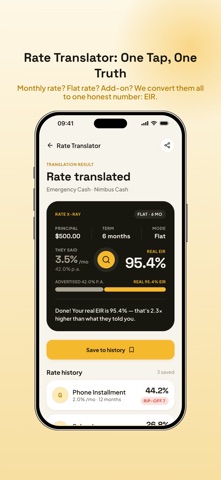
Stop guessing what your loans really cost. CostScope translates confusing interest rates into one honest number — the Effective Interest Rate (EIR) — so you finally see the true price of every dollar you borrowed. Lending apps love to hide behind "low monthly rates" and "small processing fees." CostScope strips away the marketing and shows you the real math: what you actually paid, what you're still paying, and where you got ripped off. Features: • Rate Translator — convert monthly rate, flat rate, add-on, or declining balance into true annual EIR in seconds • Hidden Cost Exposer — input processing fees, insurance, penalties; see your real total cost and "rip-off index" • Loan X-Ray Wall — record every loan you've taken, see true cost breakdown side by side • Loan Comparison PK — pit up to 3 loan offers against each other, find the cheapest one instantly • Repayment Timeline — visuali…
App details
What you can learn from Cashee CostScope
Every shipping app on the App Store has gone through the same decisions you're working through right now: which screenshot goes first, what caption sits over it, which device frame to show, what color the background should be. The 4 screenshots above are Cashee CostScope's answers to those questions — they're public, they're real, and they made it through Apple's review.
What the numbers say: Cashee CostScope runs a light set where the background shifts from screenshot to screenshot (first shot #FCE4A4) — each image has to stand on its own, so the captions carry more of the story. The accent colour we picked up, #DC7C14, is the one to reuse for badges, arrows and highlighted words if you borrow this look. Hit Use this style to open the editor with these exact colours and drop your own screenshot in.
Notice the first screenshot in particular. It's the one users see in search results and on the product page, and it's where most apps spend their best caption and tightest design. Look at the proportion of background to phone, where the text sits, what one thing the image is trying to communicate.
Want to see how other Finance apps approach the same problem? Browse more Finance apps in the showcase.
Take what works into your own screenshots
Open LaunchShots and design your App Store & Google Play screenshots — pick a device frame, drop captions, ship in minutes. Free, in your browser.
Open the screenshot editor →Apps with a similar look
Closest background + accent colours among the listings we've analysed — useful when you want to see the same palette handled by a different team.