Chart position — tracked daily by LaunchShots
Screenshot style breakdown
Sampled from 6 of Spin Street: Graffiti Slots's App Store screenshots — background, accent and theme, measured by LaunchShots (not something Apple publishes).
#FCCC14 bg
#DDB311
#7C6404 accent
#111111 text
Screenshots


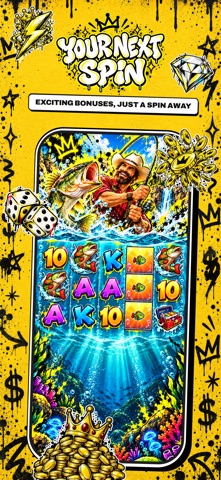


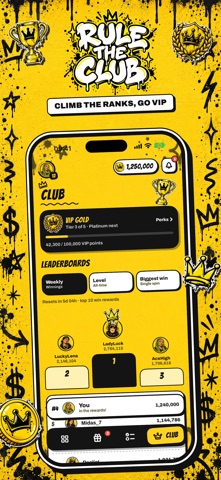
Icon palette
About this app
Spin Street is a social slots game drawn like a yellow graffiti wall, with bubble lettering, spray-paint drips and crown doodles all over it. Slots Play slot games in classic, fruit, Egypt, adventure and fantasy themes. The lobby has Hot, New and Jackpot picks, a Recent list of the slots you played last, and search. Jackpots Mini, Major and Grand jackpots are always running. Your best spins get Big Win, Mega Win and Epic Win celebrations. Coins all day The Timed Bonus pays coins every 3 hours and grows with your level and VIP tier. The Daily Wheel gives you one spin a day, with coin prizes and x2 and x3 multipliers. You also get a Scratch Card every day: match three symbols to win. 10% of every bet goes into your Piggy Bank, and you can open it once it's full. Your Inbox collects gifts, every level up pays coins, and a welcome-back bonus waits if you've been away for two days. If you…
App details
What you can learn from Spin Street: Graffiti Slots
Every shipping app on the App Store has gone through the same decisions you're working through right now: which screenshot goes first, what caption sits over it, which device frame to show, what color the background should be. The 6 screenshots above are Spin Street: Graffiti Slots's answers to those questions — they're public, they're real, and they made it through Apple's review.
What the numbers say: Spin Street: Graffiti Slots runs a mixed light-and-dark set where the background shifts from screenshot to screenshot (first shot #FCCC14) — each image has to stand on its own, so the captions carry more of the story. The accent colour we picked up, #7C6404, is the one to reuse for badges, arrows and highlighted words if you borrow this look. Hit Use this style to open the editor with these exact colours and drop your own screenshot in.
Notice the first screenshot in particular. It's the one users see in search results and on the product page, and it's where most apps spend their best caption and tightest design. Look at the proportion of background to phone, where the text sits, what one thing the image is trying to communicate.
Want to see how other Games apps approach the same problem? Browse more Games apps in the showcase.
Take what works into your own screenshots
Open LaunchShots and design your App Store & Google Play screenshots — pick a device frame, drop captions, ship in minutes. Free, in your browser.
Open the screenshot editor →Apps with a similar look
Closest background + accent colours among the listings we've analysed — useful when you want to see the same palette handled by a different team.