Chart position — tracked daily by LaunchShots
Screenshot style breakdown
Sampled from 5 of 引擎模拟器's App Store screenshots — background, accent and theme, measured by LaunchShots (not something Apple publishes).
#040C0C bg
#272E2E
#543424 accent
#FFFFFF text
Reading the caption text from the screenshots in your browser…
Screenshots


Icon palette
About this app
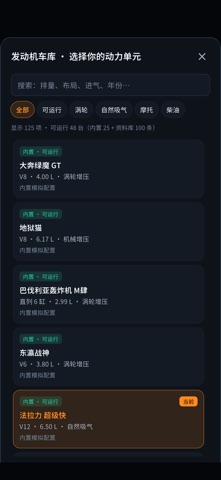
引擎模拟器把发动机模拟、开放调校和离线驾驶玩法放在一起,让你直观看懂发动机如何工作,以及参数变化如何影响动力、温度、寿命和车辆表现。 【实时发动机模拟】 • 实时计算进气、燃烧、排气、摩擦、温度与传动,转速、扭矩、功率和车速由模型持续算出。 • 机械风格仪表显示转速、车速、增压、油压、温度、空燃比、点火、爆震和燃油消耗等状态。 • 支持自动挡、手动挡、离合打滑、发动机制动、电子限速和逐挡齿比。 【3D 剖面与分析】 • 程序化呈现直列、V 型、水平对置和转子等结构,可旋转、缩放并切换剖面和观察角度。 • 提供四冲程剖面、逐缸点火、热态图、排气热流、声音波形与阶次谱、变速箱动力流和预测测功曲线。 【开放调校】 • 可调整缸数、布局、缸径、行程、压缩比、红线、进气形式、增压、中冷、燃油、空燃比和点火等参数。 • 调校后立即查看功率和扭矩预测、机械风险、温度与部件寿命变化。 • 支持本地命名存档、JSON 导入导出、维修、结构强化、排气改装,以及发动机、变速箱和车辆参数恢复。 【170 台发动机模型】 • 目前共有 170 台可启动运行…
App details
What you can learn from 引擎模拟器
Every shipping app on the App Store has gone through the same decisions you're working through right now: which screenshot goes first, what caption sits over it, which device frame to show, what color the background should be. The 5 screenshots above are 引擎模拟器's answers to those questions — they're public, they're real, and they made it through Apple's review.
What the numbers say: 引擎模拟器 runs a dark set with one background colour (#040C0C) carried across every screenshot — the listing reads as a single poster when the shots sit side by side in search results. The accent colour we picked up, #543424, is the one to reuse for badges, arrows and highlighted words if you borrow this look. Hit Use this style to open the editor with these exact colours and drop your own screenshot in.
Notice the first screenshot in particular. It's the one users see in search results and on the product page, and it's where most apps spend their best caption and tightest design. Look at the proportion of background to phone, where the text sits, what one thing the image is trying to communicate.
Want to see how other Entertainment apps approach the same problem? Browse more Entertainment apps in the showcase.
Take what works into your own screenshots
Open LaunchShots and design your App Store & Google Play screenshots — pick a device frame, drop captions, ship in minutes. Free, in your browser.
Open the screenshot editor →Apps with a similar look
Closest background + accent colours among the listings we've analysed — useful when you want to see the same palette handled by a different team.