Chart position — tracked daily by LaunchShots
Screenshot style breakdown
Sampled from 3 of 新・都道府県ゲーム's App Store screenshots — background, accent and theme, measured by LaunchShots (not something Apple publishes).
#F4F4EC bg
#D6D6CF
#142C4C accent
#111111 text
Screenshots


Icon palette
About this app
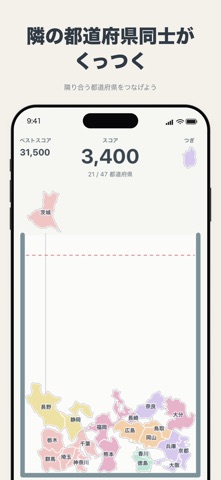
地図で隣り合う都道府県だけが、本物の地図どおりにくっつくパズルゲームです。 東京都と神奈川県、大阪府と京都府……隣の県同士が箱の中で触れると、県境がぴったり合わさって1つの形になります。隣でない県はくっつきません。つなげていくと関東や近畿などの地方になり、47都道府県がすべてつながると日本列島の完成です。 ■ 遊び方 ・指で県を左右に動かして、離すと箱に落ちます ・隣の県同士が触れると合体。地方の県がそろうと「〇〇地方 完成!」 ・詰まったら「シャッフル」で箱をゆらして、県を転がし直せます ・47都道府県を落としきったら、60秒以内に日本列島を完成させましょう ・完成すると日本列島が消えて、次の周が始まります。何周つなげられるかに挑戦です ・箱からあふれるか、60秒が過ぎたら終わり はじめて遊ぶときは、指のイラストが操作を案内します。 ■ 鬼畜モード ホームの「鬼畜モード」から、最初から遊べます。 ・都道府県名なし、色はすべて同じ緑。形だけが手がかりです ・出る順番はバラバラ。隣の県が来るとは限りません ・タイム…
App details
What you can learn from 新・都道府県ゲーム
Every shipping app on the App Store has gone through the same decisions you're working through right now: which screenshot goes first, what caption sits over it, which device frame to show, what color the background should be. The 3 screenshots above are 新・都道府県ゲーム's answers to those questions — they're public, they're real, and they made it through Apple's review.
What the numbers say: 新・都道府県ゲーム runs a light set with one background colour (#F4F4EC) carried across every screenshot — the listing reads as a single poster when the shots sit side by side in search results. The accent colour we picked up, #142C4C, is the one to reuse for badges, arrows and highlighted words if you borrow this look. Hit Use this style to open the editor with these exact colours and drop your own screenshot in.
Notice the first screenshot in particular. It's the one users see in search results and on the product page, and it's where most apps spend their best caption and tightest design. Look at the proportion of background to phone, where the text sits, what one thing the image is trying to communicate.
Want to see how other Games apps approach the same problem? Browse more Games apps in the showcase.
Take what works into your own screenshots
Open LaunchShots and design your App Store & Google Play screenshots — pick a device frame, drop captions, ship in minutes. Free, in your browser.
Open the screenshot editor →Apps with a similar look
Closest background + accent colours among the listings we've analysed — useful when you want to see the same palette handled by a different team.