Chart position — tracked daily by LaunchShots
Screenshot style breakdown
Sampled from 6 of にしてつバスナビ's App Store screenshots — background, accent and theme, measured by LaunchShots (not something Apple publishes).
#0444FC bg
#275EFC
#6CA4FC accent
#FFFFFF text
Screenshots


Icon palette
About this app
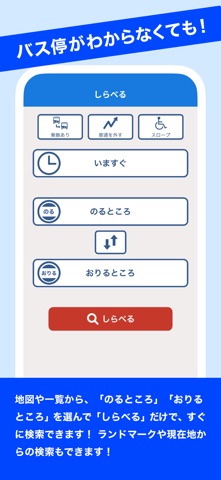
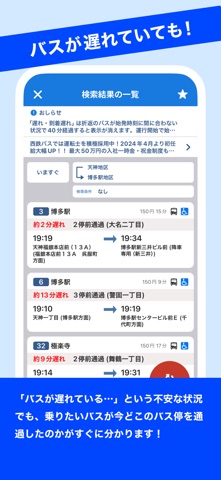
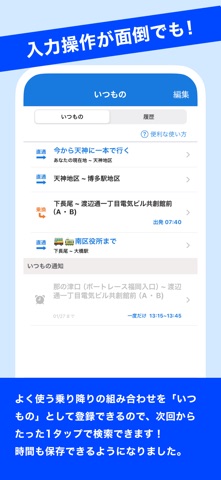
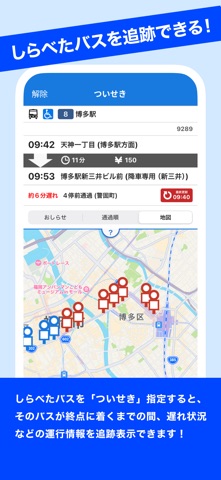
いつも西鉄バスをご利用いただき、ありがとうございます! このアプリは、「西鉄バスは分かりにくい!」というお客さまのご不満を解消すべく、開発いたしました。 位置情報を利用して目的地までのバスを直感的にお選びいただけます。 このアプリで西鉄のバスや電車をもっと身近に感じていただければ幸いです! ■ 主な機能 <しらべる> ・西鉄のバスや電車の乗り換え検索(ルートに、西鉄の高速バス・西鉄電車を含む) ・日時や、始発・最終を指定した検索(日時は一週間先まで。過去検索は不可) ・バス停/ランドマーク(地区名)を名称で検索(漢字・ひらがな・アルファベット) ・地図で乗り降りしたい場所を自由に指定して検索すると、最寄りバス停を自動で選択 ・直通/乗り換えの路線を絞り込める ・乗り降りの組み合わせをURL化して、SNSを使ってシェアできる ・検索後、乗り降りの組み合わせを「いつもの」としてブックマーク保存できる ・検索後、「ついせき」に保存すると、検索したバスの運行情報を終点まで追いかけられる ・検索結果の情報を文字情報と…
App details
What you can learn from にしてつバスナビ
Every shipping app on the App Store has gone through the same decisions you're working through right now: which screenshot goes first, what caption sits over it, which device frame to show, what color the background should be. The 6 screenshots above are にしてつバスナビ's answers to those questions — they're public, they're real, and they made it through Apple's review.
What the numbers say: にしてつバスナビ runs a mixed light-and-dark set where the background shifts from screenshot to screenshot (first shot #0444FC) — each image has to stand on its own, so the captions carry more of the story. The accent colour we picked up, #6CA4FC, is the one to reuse for badges, arrows and highlighted words if you borrow this look. Hit Use this style to open the editor with these exact colours and drop your own screenshot in.
Notice the first screenshot in particular. It's the one users see in search results and on the product page, and it's where most apps spend their best caption and tightest design. Look at the proportion of background to phone, where the text sits, what one thing the image is trying to communicate.
Want to see how other Navigation apps approach the same problem? Browse more Navigation apps in the showcase.
Take what works into your own screenshots
Open LaunchShots and design your App Store & Google Play screenshots — pick a device frame, drop captions, ship in minutes. Free, in your browser.
Open the screenshot editor →Apps with a similar look
Closest background + accent colours among the listings we've analysed — useful when you want to see the same palette handled by a different team.