Chart position — tracked daily by LaunchShots
Screenshot style breakdown
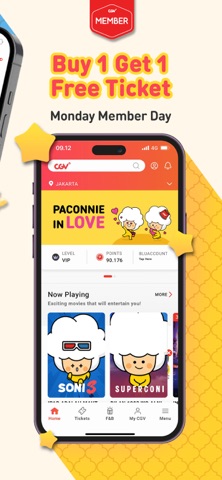
Sampled from 6 of CGV CINEMAS INDONESIA's App Store screenshots — background, accent and theme, measured by LaunchShots (not something Apple publishes).
#FCF4EC bg
#DDD6CF
#FCD42C accent
#111111 text
Screenshots




Icon palette
About this app
Nonton Lebih Seru dan Asik bareng CGV! Siap-siap buat pengalaman nonton di bioskop yang lebih happy. Semua jadi lebih mudah dan praktis dengan Aplikasi CGV, mulai dari beli tiket sampai pesan popcorn langsung dari aplikasi. Nikmati juga berbagai diskon spesial untuk member. Alasan Kenapa Kamu Wajib Jadi CGV Member Karena banyak banget keuntungannya: * Gratis popcorn untuk member baru * Buy 1 Get 1 Free Ticket setiap Monday Member Day * Biaya admin paling murah hanya Rp1.990 per tiket * Beli tiket tanpa antre, semua bisa dari aplikasi * Undangan eksklusif untuk premiere film terbaru Semua keuntungan ini bisa kamu nikmati di aplikasi CGV Indonesia. Pembayaran Super Mudah Gunakan e-wallet, kartu debit, atau QRIS. Semua metode pembayaran tersedia, aman, dan cepat. Nikmati Pengalaman Nonton Paling Seru Mulai dari 2D, 3D, 4DX, hingga ScreenX. CGV menghadirkan berbagai format auditorium d…
App details
What you can learn from CGV CINEMAS INDONESIA
Every shipping app on the App Store has gone through the same decisions you're working through right now: which screenshot goes first, what caption sits over it, which device frame to show, what color the background should be. The 6 screenshots above are CGV CINEMAS INDONESIA's answers to those questions — they're public, they're real, and they made it through Apple's review.
What the numbers say: CGV CINEMAS INDONESIA runs a light set with one background colour (#FCF4EC) carried across every screenshot — the listing reads as a single poster when the shots sit side by side in search results. The accent colour we picked up, #FCD42C, is the one to reuse for badges, arrows and highlighted words if you borrow this look. Hit Use this style to open the editor with these exact colours and drop your own screenshot in.
Notice the first screenshot in particular. It's the one users see in search results and on the product page, and it's where most apps spend their best caption and tightest design. Look at the proportion of background to phone, where the text sits, what one thing the image is trying to communicate.
Want to see how other Entertainment apps approach the same problem? Browse more Entertainment apps in the showcase.
Take what works into your own screenshots
Open LaunchShots and design your App Store & Google Play screenshots — pick a device frame, drop captions, ship in minutes. Free, in your browser.
Open the screenshot editor →Apps with a similar look
Closest background + accent colours among the listings we've analysed — useful when you want to see the same palette handled by a different team.