Chart position — tracked daily by LaunchShots
Screenshot style breakdown
Sampled from 6 of 【公式】お薬手帳-ポイントも貯まる's App Store screenshots — background, accent and theme, measured by LaunchShots (not something Apple publishes).
#F4F4F4 bg
#D6D6D6
#14BC6C accent
#111111 text
Reading the caption text from the screenshots in your browser…
Screenshots



Icon palette
About this app
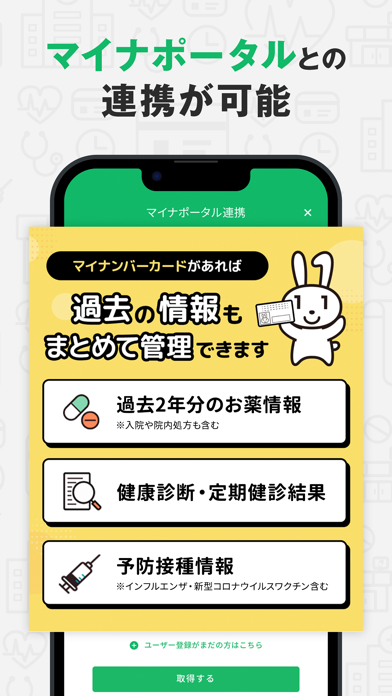
2024年3月時点で、アプリ利用者数が500万人を突破しました。 【機能追加のお知らせ】 ①毎日の血圧値も一緒に管理できるようになりました 朝晩2回ずつの血圧測定値を入力すると、表・グラフで日々の変化を確認することができます。 使い方は、朝晩2回測定した最高・最低血圧値を入力すると、自動で平均値を計算して表・グラフに表示されます。 ※血圧や脈拍などの情報はヘルスケアアプリからデータ取得することができます ②予防接種ワクチンの登録・管理ができるようになりました 小児予防接種のワクチンや高齢者用ワクチンなど、年齢に合わせたワクチン接種の記録ができます。 また、次回の接種予定日の登録もできるのでスケジュール管理としても便利に活用いただけます。 ● 紙のお薬手帳に代わる「電子お薬手帳アプリ」 ● QRコード読み込みや写真保存でラクラク記帳 ● 家族分のお薬手帳もスマホ1台でまとめて管理 ● お薬データをサーバーで管理しているので、バックアップや機種変更、紛失しても安心 ● 電波が届かない場所や、災害などの非常時でもお薬デー…
App details
What you can learn from 【公式】お薬手帳-ポイントも貯まる
Every shipping app on the App Store has gone through the same decisions you're working through right now: which screenshot goes first, what caption sits over it, which device frame to show, what color the background should be. The 8 screenshots above are 【公式】お薬手帳-ポイントも貯まる's answers to those questions — they're public, they're real, and they made it through Apple's review.
What the numbers say: 【公式】お薬手帳-ポイントも貯まる runs a light set where the background shifts from screenshot to screenshot (first shot #F4F4F4) — each image has to stand on its own, so the captions carry more of the story. The accent colour we picked up, #14BC6C, is the one to reuse for badges, arrows and highlighted words if you borrow this look. Hit Use this style to open the editor with these exact colours and drop your own screenshot in.
Notice the first screenshot in particular. It's the one users see in search results and on the product page, and it's where most apps spend their best caption and tightest design. Look at the proportion of background to phone, where the text sits, what one thing the image is trying to communicate.
Want to see how other Medical apps approach the same problem? Browse more Medical apps in the showcase.
Take what works into your own screenshots
Open LaunchShots and design your App Store & Google Play screenshots — pick a device frame, drop captions, ship in minutes. Free, in your browser.
Open the screenshot editor →Apps with a similar look
Closest background + accent colours among the listings we've analysed — useful when you want to see the same palette handled by a different team.