Chart position — tracked daily by LaunchShots
Screenshot style breakdown
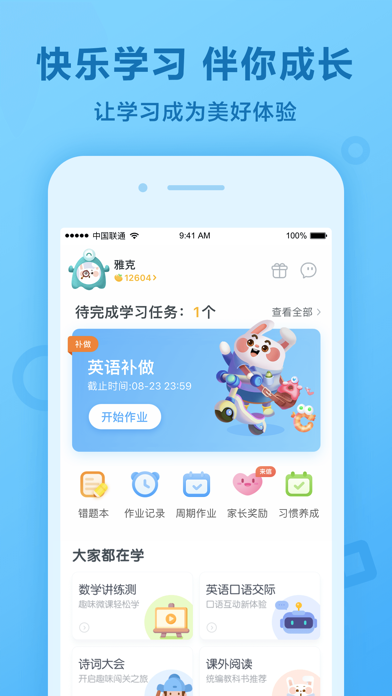
Sampled from 3 of 一起作业(原一起小学学生)'s App Store screenshots — background, accent and theme, measured by LaunchShots (not something Apple publishes).
#7CD4FC bg
#6DBADD
#146CB4 accent
#111111 text
Screenshots


iPad screenshots


Icon palette
About this app
一起小学学生,专为小学生研发的在线学习App,让学生用手机就可以练习听力、学习口语、做速算练习。 功能简介: 1. 趣味学习App,让学习随时随地,酷劲十足 同步练习题,实用、生动又有趣 英语跟读练口语,方便、快捷又好用 2. 自动批改,错题重做,我的学习我做主 完成练习立刻了解练习情况,不用再等老师批改 错题还可以重做,反复练习更牢固 3.老师点评,我的成就看得见 练习做得好不好,老师来点评 努力学习,认真练习,取得好成就 4. 科学护眼:合理使用电子产品,全方位养成良好习惯 定时护眼提示,休息眼睛、远眺放松 夜间模式、规范模式,进一步保护视力健康 老师推荐建议时长,家长也能自主控 一起小学学生怎么使用? 1.注册一个学生账号,输入自己的名字,根据老师给的号码,加入自己所在的班级。 2.点击“开始练习”,完成老师推荐的各项练习。 3.完成练习后,可以在“练习记录”中查看完成情况。 公司简介: 一起教育科技是全球领先的K12智能教育平台,致力于提供更为高效、美好的产品和体验。经过七年的发展,一起教育科技已在全国31个省市的13万所学校…
App details
What you can learn from 一起作业(原一起小学学生)
Every shipping app on the App Store has gone through the same decisions you're working through right now: which screenshot goes first, what caption sits over it, which device frame to show, what color the background should be. The 6 screenshots above are 一起作业(原一起小学学生)'s answers to those questions — they're public, they're real, and they made it through Apple's review.
What the numbers say: 一起作业(原一起小学学生) runs a mixed light-and-dark set where the background shifts from screenshot to screenshot (first shot #7CD4FC) — each image has to stand on its own, so the captions carry more of the story. The accent colour we picked up, #146CB4, is the one to reuse for badges, arrows and highlighted words if you borrow this look. Hit Use this style to open the editor with these exact colours and drop your own screenshot in.
Notice the first screenshot in particular. It's the one users see in search results and on the product page, and it's where most apps spend their best caption and tightest design. Look at the proportion of background to phone, where the text sits, what one thing the image is trying to communicate.
Want to see how other Education apps approach the same problem? Browse more Education apps in the showcase.
Take what works into your own screenshots
Open LaunchShots and design your App Store & Google Play screenshots — pick a device frame, drop captions, ship in minutes. Free, in your browser.
Open the screenshot editor →Apps with a similar look
Closest background + accent colours among the listings we've analysed — useful when you want to see the same palette handled by a different team.