Chart position — tracked daily by LaunchShots
Screenshot style breakdown
Sampled from 5 of ROOVEE's App Store screenshots — background, accent and theme, measured by LaunchShots (not something Apple publishes).
#FCEC04 bg
#DDCF03
#4C3C04 accent
#111111 text
Screenshots



Icon palette
About this app
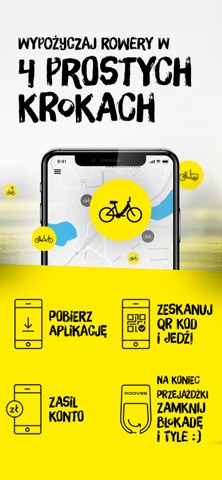
Dzięki aplikacji mobilnej w kilka sekund uruchomisz przejazd Twoim ROOVEE. Po pobraniu aplikacji zarejestruj swoje konto w systemie, doładuj elektroniczną portmonetkę wymaganą przez operatora kwotą i uruchamiaj przejazd za pomocą kodu QR umieszczonego na rowerze. Po zakończeniu przejazdu zamknij urządzenie zabezpieczające rower zgodnie z animacją w aplikacji i nie martw się o stan swoich środków. W każdej chwili możesz również wstrzymać przejazd Twoim ROOVEE za pomocą opcji pauzy i bez przeszkód zrobić zakupy czy wypić kawę ze znajomymi. Twój rower w tym czasie będzie zarezerwowany tylko dla Ciebie. W przypadku gdy zauważysz usterkę ROOVEE zgłoś ją do nas za pomocą intuicyjnego interfejsu zgłaszania usterek. Pamiętaj że sprawny rower ROOVEE to Twoje bezpieczeństwo i komfort użytkowania. Zeskanuj kod i ruszaj w drogę Twoim ROOVEE!
App details
What you can learn from ROOVEE
Every shipping app on the App Store has gone through the same decisions you're working through right now: which screenshot goes first, what caption sits over it, which device frame to show, what color the background should be. The 5 screenshots above are ROOVEE's answers to those questions — they're public, they're real, and they made it through Apple's review.
What the numbers say: ROOVEE runs a light set with one background colour (#FCEC04) carried across every screenshot — the listing reads as a single poster when the shots sit side by side in search results. The accent colour we picked up, #4C3C04, is the one to reuse for badges, arrows and highlighted words if you borrow this look. Hit Use this style to open the editor with these exact colours and drop your own screenshot in.
Notice the first screenshot in particular. It's the one users see in search results and on the product page, and it's where most apps spend their best caption and tightest design. Look at the proportion of background to phone, where the text sits, what one thing the image is trying to communicate.
Want to see how other Travel apps approach the same problem? Browse more Travel apps in the showcase.
Take what works into your own screenshots
Open LaunchShots and design your App Store & Google Play screenshots — pick a device frame, drop captions, ship in minutes. Free, in your browser.
Open the screenshot editor →Apps with a similar look
Closest background + accent colours among the listings we've analysed — useful when you want to see the same palette handled by a different team.