Chart position — tracked daily by LaunchShots
Screenshot style breakdown
Sampled from 6 of 毎日漢字 - 漢検対策や日々の漢字練習に's App Store screenshots — background, accent and theme, measured by LaunchShots (not something Apple publishes).
#249CFC bg
#42A9FC
#84C4FC accent
#FFFFFF text
Screenshots



iPad screenshots




Icon palette
About this app
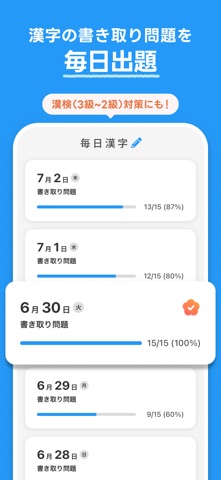
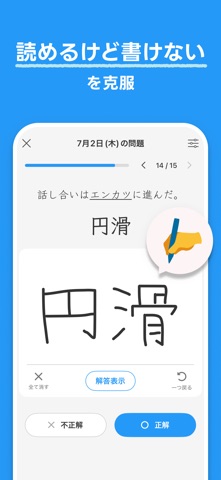
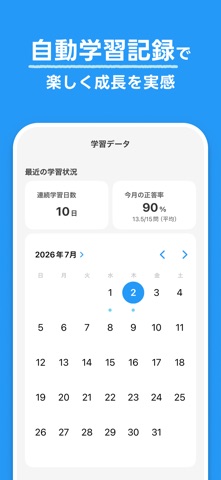
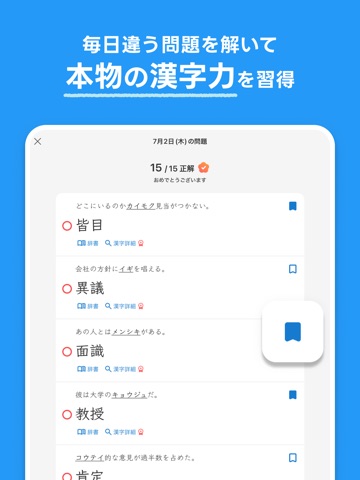
毎日出題される漢字の書き取り問題を、指で書いて解くだけ。 シンプルで続けやすい漢字トレーニングアプリです。 「読めるけど書けない」をなくし、本物の漢字力を鍛えます。 ▼ こんな方におすすめ ・漢検(3級/準2級/2級)の合格を目指している ・「読めるのに書けない」漢字をなくしたい ・スキマ時間にコツコツ漢字を勉強したい ・大人になってからの学び直しをしたい ・脳トレをしたい ・語彙力を高めたい ・日本語力を深めたい ▼ 主な特徴 ・毎日、漢字の書き取り問題を出題します。 ・1日の問題数は3〜15問から選べるので、自分のペースで無理なく続けられます。 ・指やペンで漢字を書く学習スタイルです。 ・解答はすべて常用漢字になります。 ・答え合わせは自己採点方式です。 ・オリジナル問題の自作もOK。学校や仕事で出会った漢字も登録できます。 ・12色のフォルダで苦手な問題を整理できます。 ・学習データが記録されるので、少しずつ続けた成長を振り返れます。 ・通知で学習習慣をサポートします。 ▼ さらに深く学べるプレミアムプラン 「毎日漢字…
App details
What you can learn from 毎日漢字 - 漢検対策や日々の漢字練習に
Every shipping app on the App Store has gone through the same decisions you're working through right now: which screenshot goes first, what caption sits over it, which device frame to show, what color the background should be. The 12 screenshots above are 毎日漢字 - 漢検対策や日々の漢字練習に's answers to those questions — they're public, they're real, and they made it through Apple's review.
What the numbers say: 毎日漢字 - 漢検対策や日々の漢字練習に runs a dark set with one background colour (#249CFC) carried across every screenshot — the listing reads as a single poster when the shots sit side by side in search results. The accent colour we picked up, #84C4FC, is the one to reuse for badges, arrows and highlighted words if you borrow this look. Hit Use this style to open the editor with these exact colours and drop your own screenshot in.
Notice the first screenshot in particular. It's the one users see in search results and on the product page, and it's where most apps spend their best caption and tightest design. Look at the proportion of background to phone, where the text sits, what one thing the image is trying to communicate.
Want to see how other Education apps approach the same problem? Browse more Education apps in the showcase.
Take what works into your own screenshots
Open LaunchShots and design your App Store & Google Play screenshots — pick a device frame, drop captions, ship in minutes. Free, in your browser.
Open the screenshot editor →Apps with a similar look
Closest background + accent colours among the listings we've analysed — useful when you want to see the same palette handled by a different team.