Chart position — tracked daily by LaunchShots
Screenshot changes — detected by LaunchShots
Screenshot style breakdown
Sampled from 3 of GビズID's App Store screenshots — background, accent and theme, measured by LaunchShots (not something Apple publishes).
#FCFCFC bg
#DDDDDD
#143CDC accent
#111111 text
Reading the caption text from the screenshots in your browser…
Screenshots


iPad screenshots


Icon palette
About this app
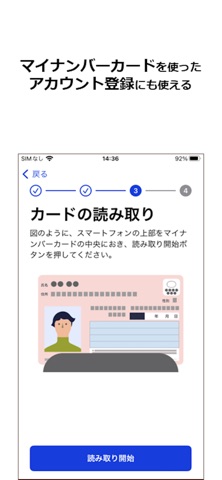
GビズIDアプリは、デジタル庁が提供する事業者(法人、個人事業主)向け認証サービス「GビズID」のオンライン申請および二要素認証を行うアプリケーションです。 二要素認証とは、IDとパスワードによる認証に加えて、もう一つの要素(本アプリ)を使用して認証する方式です。これにより、第三者による不正利用のリスクを低減し、セキュリティを強化することができます。 また、本アプリとマイナンバーカードを利用することで、GビズIDプライムアカウント(法人代表者、個人事業主)を最短即日取得することができます。 ▼できること ①オンライン申請 マイナンバーカードを使ったGビズIDのアカウント登録申請、アカウント復旧申請、代表者情報変更申請などを行えます。 ②二要素認証 GビズIDマイページやGビズIDと連携した行政システムへのログイン時に、ID/パスワード入力に加えて本アプリを使った簡単な操作で二要素認証を行うことで、より安全にご利用いただけます。なお、1つのアプリで複数のアカウントを登録できますが、1つのアカウントは1つのアプリに…
App details
What you can learn from GビズID
Every shipping app on the App Store has gone through the same decisions you're working through right now: which screenshot goes first, what caption sits over it, which device frame to show, what color the background should be. The 5 screenshots above are GビズID's answers to those questions — they're public, they're real, and they made it through Apple's review.
What the numbers say: GビズID runs a light set with one background colour (#FCFCFC) carried across every screenshot — the listing reads as a single poster when the shots sit side by side in search results. The accent colour we picked up, #143CDC, is the one to reuse for badges, arrows and highlighted words if you borrow this look. Hit Use this style to open the editor with these exact colours and drop your own screenshot in.
Notice the first screenshot in particular. It's the one users see in search results and on the product page, and it's where most apps spend their best caption and tightest design. Look at the proportion of background to phone, where the text sits, what one thing the image is trying to communicate.
Want to see how other Business apps approach the same problem? Browse more Business apps in the showcase.
Take what works into your own screenshots
Open LaunchShots and design your App Store & Google Play screenshots — pick a device frame, drop captions, ship in minutes. Free, in your browser.
Open the screenshot editor →Apps with a similar look
Closest background + accent colours among the listings we've analysed — useful when you want to see the same palette handled by a different team.