Chart position — tracked daily by LaunchShots
Screenshot changes — detected by LaunchShots
Screenshot style breakdown
Sampled from 6 of 映画アプリ MOVIE WALKERで映画・映画館が探せる's App Store screenshots — background, accent and theme, measured by LaunchShots (not something Apple publishes).
#E41C0C bg
#E73B2E
#FC9C94 accent
#FFFFFF text
Screenshots





Icon palette
About this app
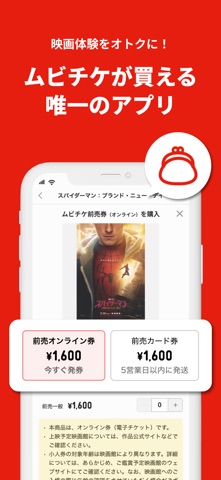
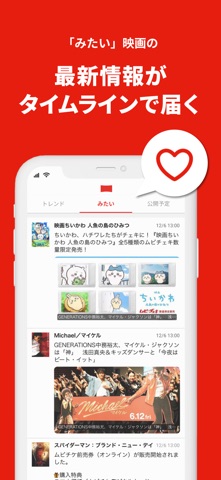
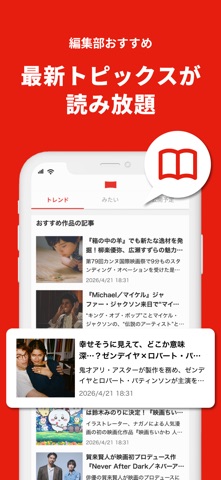
【あらゆる映画体験をオトクに】国内最大級の映画情報サービス「MOVIE WALKER(ムービーウォーカー)」の公式アプリ。 チケット・グッズ購入から鑑賞記録まで。試写会やプレゼント情報も豊富な、映画アプリの決定版! <MOVIE WALKERアプリの魅力> ●話題の映画がすぐわかる トレンド、興行ランキング、ユーザーレビューなどから話題の作品が一目でわかります。「みたい」をつければ、気になる作品をワンタップでメモできます。 ●最大500円オトクな「ムビチケ」を購入できる 国内唯一、デジタル映画鑑賞券ムビチケ(オンライン&カード)を購入できるアプリ。毎月、ムビチケ全作品に使える特典コードも配布中! ●全国の上映スケジュールを網羅 全国3600スクリーン規模の上映スケジュールを随時更新。 「今から」検索で、場所・時間に合った上映もすぐわかります。 ●試写会・プレゼント情報を毎週お届け 限定イベントへのご招待など、プレミアムな情報も多数! ●プッシュ通知でリマインド 公開前にプッシュ通知でムビチケの販売終了をお知らせ。オトクな前売券…
App details
What you can learn from 映画アプリ MOVIE WALKERで映画・映画館が探せる
Every shipping app on the App Store has gone through the same decisions you're working through right now: which screenshot goes first, what caption sits over it, which device frame to show, what color the background should be. The 8 screenshots above are 映画アプリ MOVIE WALKERで映画・映画館が探せる's answers to those questions — they're public, they're real, and they made it through Apple's review.
What the numbers say: 映画アプリ MOVIE WALKERで映画・映画館が探せる runs a dark set with one background colour (#E41C0C) carried across every screenshot — the listing reads as a single poster when the shots sit side by side in search results. The accent colour we picked up, #FC9C94, is the one to reuse for badges, arrows and highlighted words if you borrow this look. Hit Use this style to open the editor with these exact colours and drop your own screenshot in.
Notice the first screenshot in particular. It's the one users see in search results and on the product page, and it's where most apps spend their best caption and tightest design. Look at the proportion of background to phone, where the text sits, what one thing the image is trying to communicate.
Want to see how other Entertainment apps approach the same problem? Browse more Entertainment apps in the showcase.
Take what works into your own screenshots
Open LaunchShots and design your App Store & Google Play screenshots — pick a device frame, drop captions, ship in minutes. Free, in your browser.
Open the screenshot editor →Apps with a similar look
Closest background + accent colours among the listings we've analysed — useful when you want to see the same palette handled by a different team.