Chart position — tracked daily by LaunchShots
Screenshot changes — detected by LaunchShots
Screenshot style breakdown
Sampled from 6 of 就活はLognavi ログナビ|AI面接と適性検査's App Store screenshots — background, accent and theme, measured by LaunchShots (not something Apple publishes).
#FCFCFC bg
#DDDDDD
#0C6CDC accent
#111111 text
Reading the caption text from the screenshots in your browser…
Screenshots


iPad screenshots




Icon palette
About this app
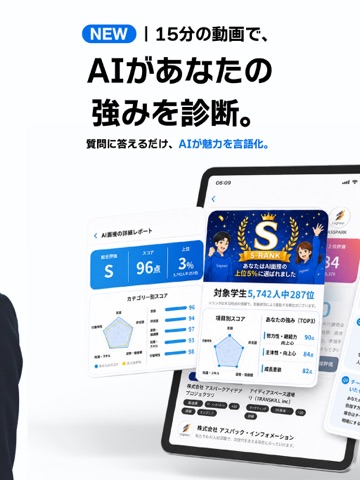
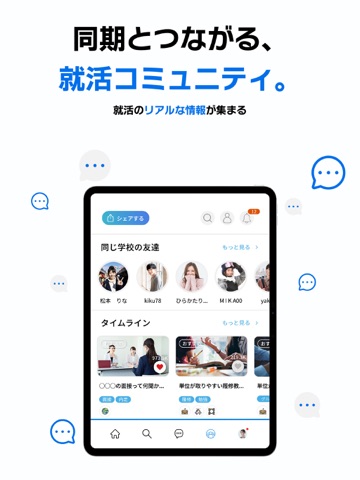
\ AI面接に答えるだけで、自分の強みが5つの面から分かります! / Lognaviは、AI面接と適性テストの結果から、自分に合う企業とマッチングできる就活アプリです。 累計45万ダウンロード、25万人の学生が使っています。 ■ Lognaviの特徴 ◆ 24時間365日、いつでもAI面接を受けられます 深夜でも早朝でも、思い立ったときにスマホで受けられます。 ◆ 全国の受験者の中で、自分が上位何%かが分かります 今の自分の面接がどのくらいのレベルなのかが分かります。 ◆ スカウト受信率99.6% ※プロフィールを入力して適性テストを受けた24卒学生の実績 ◆ 登録は3分、適性検査は10分、AI面接は15分から20分 ◆ 学年も卒業年度も問いません ◆ 学生の利用はすべて無料です ■ NEW|AI面接がはじまりました スマホひとつで面接の練習ができます。AIが質問するので、あなたは答えるだけです。 かかる時間は15分から20分ほどです。 答えた内容は、話の伝わりやすさ、話すときの様子、考え方や価値観、知識やスキル、 行動のしかたの5つの面から評価されます。 どこを直せ…
App details
What you can learn from 就活はLognavi ログナビ|AI面接と適性検査
Every shipping app on the App Store has gone through the same decisions you're working through right now: which screenshot goes first, what caption sits over it, which device frame to show, what color the background should be. The 15 screenshots above are 就活はLognavi ログナビ|AI面接と適性検査's answers to those questions — they're public, they're real, and they made it through Apple's review.
What the numbers say: 就活はLognavi ログナビ|AI面接と適性検査 runs a light set with one background colour (#FCFCFC) carried across every screenshot — the listing reads as a single poster when the shots sit side by side in search results. The accent colour we picked up, #0C6CDC, is the one to reuse for badges, arrows and highlighted words if you borrow this look. Hit Use this style to open the editor with these exact colours and drop your own screenshot in.
Notice the first screenshot in particular. It's the one users see in search results and on the product page, and it's where most apps spend their best caption and tightest design. Look at the proportion of background to phone, where the text sits, what one thing the image is trying to communicate.
Want to see how other Business apps approach the same problem? Browse more Business apps in the showcase.
Take what works into your own screenshots
Open LaunchShots and design your App Store & Google Play screenshots — pick a device frame, drop captions, ship in minutes. Free, in your browser.
Open the screenshot editor →Apps with a similar look
Closest background + accent colours among the listings we've analysed — useful when you want to see the same palette handled by a different team.