Chart position — tracked daily by LaunchShots
Screenshot style breakdown
Sampled from 6 of ビジネスマッチング - BizSPOT(ビズスポット)'s App Store screenshots — background, accent and theme, measured by LaunchShots (not something Apple publishes).
#A40C2C bg
#B02E49
#A45C6C accent
#FFFFFF text
Screenshots




iPad screenshots


Icon palette
About this app
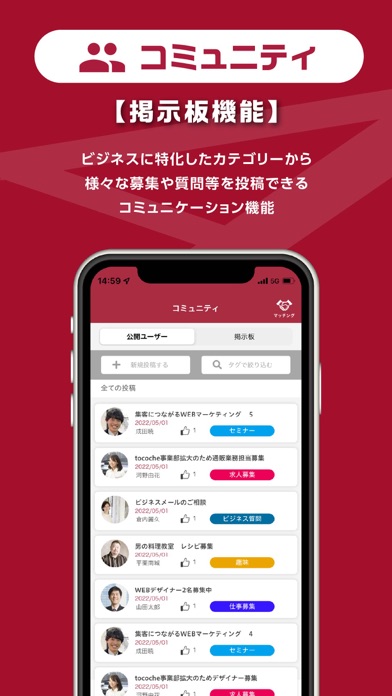
/ BizSPOT(ビズスポット)アプリでビジネスマッチング \ かしこまったメールや名刺交換の前に、気軽につながることができるコミュニケーションツールです。 登録している職業や地域によって仕事仲間を見つけることができます。 コミュニティに参加して仕事仲間の輪を広げてみましょう! 【BizSPOTアプリご利用の流れ】 1.インストール後、アカウント情報を登録します。 2.コミュニティから職業やエリアでメンバーを検索できます。 3.気になるメンバーのページに「いいね!」を残すことができます。 4.メンバー同士でメッセージのやり取りが可能です。設定により、「いいね!」を押した相手にのみメッセージの送受信を限定できます。 5.クレジット決済を登録するとコワーキングスペースをお得にご利用可能です。休憩やテレワークはもちろん、メンバー同士のミーティングにも便利です。 【コミュニティ・メッセージ機能】 コミュニティはリアルタイムでプロフィールを公開している全ての利用者が表示されます。 自分に必要な職種やスキルを持った仕事仲間を探すこ…
App details
What you can learn from ビジネスマッチング - BizSPOT(ビズスポット)
Every shipping app on the App Store has gone through the same decisions you're working through right now: which screenshot goes first, what caption sits over it, which device frame to show, what color the background should be. The 16 screenshots above are ビジネスマッチング - BizSPOT(ビズスポット)'s answers to those questions — they're public, they're real, and they made it through Apple's review.
What the numbers say: ビジネスマッチング - BizSPOT(ビズスポット) runs a dark set with one background colour (#A40C2C) carried across every screenshot — the listing reads as a single poster when the shots sit side by side in search results. The accent colour we picked up, #A45C6C, is the one to reuse for badges, arrows and highlighted words if you borrow this look. Hit Use this style to open the editor with these exact colours and drop your own screenshot in.
Notice the first screenshot in particular. It's the one users see in search results and on the product page, and it's where most apps spend their best caption and tightest design. Look at the proportion of background to phone, where the text sits, what one thing the image is trying to communicate.
Want to see how other Business apps approach the same problem? Browse more Business apps in the showcase.
Take what works into your own screenshots
Open LaunchShots and design your App Store & Google Play screenshots — pick a device frame, drop captions, ship in minutes. Free, in your browser.
Open the screenshot editor →Apps with a similar look
Closest background + accent colours among the listings we've analysed — useful when you want to see the same palette handled by a different team.