Chart position — tracked daily by LaunchShots
Screenshot style breakdown
Sampled from 6 of 警笛和警灯模拟器 - 手持LED警报器's App Store screenshots — background, accent and theme, measured by LaunchShots (not something Apple publishes).
#FC0404 bg
#FC2727
#0C04FC accent
#FFFFFF text
Reading the caption text from the screenshots in your browser…
Screenshots
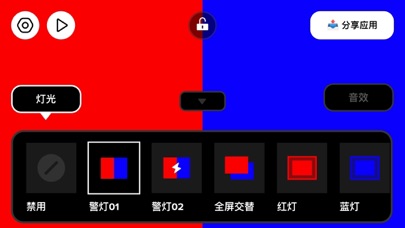


iPad screenshots


Icon palette
About this app
40多种警笛和警报音效,配合40多种全屏LED闪光模式,帮你轻松模拟出逼真的警报效果! 多种闪光模式随意组合,根据场景不同,你也可以单独关闭声音或者灯光。 除了模拟警灯之外,也可用在不同场合的信息传递工具,如转向提示,禁止通行,3秒倒计时等。 声音也有40种可选,包括警车、救护车、消防车、警报声、喇叭声等,多种情景模式,总有一款满足你的需要~ 无订阅,不会自动续费,一次付费即可解锁全部PRO内容,请放心使用!
App details
What you can learn from 警笛和警灯模拟器 - 手持LED警报器
Every shipping app on the App Store has gone through the same decisions you're working through right now: which screenshot goes first, what caption sits over it, which device frame to show, what color the background should be. The 14 screenshots above are 警笛和警灯模拟器 - 手持LED警报器's answers to those questions — they're public, they're real, and they made it through Apple's review.
What the numbers say: 警笛和警灯模拟器 - 手持LED警报器 runs a dark set where the background shifts from screenshot to screenshot (first shot #FC0404) — each image has to stand on its own, so the captions carry more of the story. The accent colour we picked up, #0C04FC, is the one to reuse for badges, arrows and highlighted words if you borrow this look. Hit Use this style to open the editor with these exact colours and drop your own screenshot in.
Notice the first screenshot in particular. It's the one users see in search results and on the product page, and it's where most apps spend their best caption and tightest design. Look at the proportion of background to phone, where the text sits, what one thing the image is trying to communicate.
Want to see how other Entertainment apps approach the same problem? Browse more Entertainment apps in the showcase.
Take what works into your own screenshots
Open LaunchShots and design your App Store & Google Play screenshots — pick a device frame, drop captions, ship in minutes. Free, in your browser.
Open the screenshot editor →Apps with a similar look
Closest background + accent colours among the listings we've analysed — useful when you want to see the same palette handled by a different team.