Screenshot style breakdown
Sampled from 6 of 随手记-快捷自动记账's App Store screenshots — background, accent and theme, measured by LaunchShots (not something Apple publishes).
#FCFCFC bg
#DDDDDD
#EC0404 accent
#111111 text
Screenshots



Icon palette
About this app
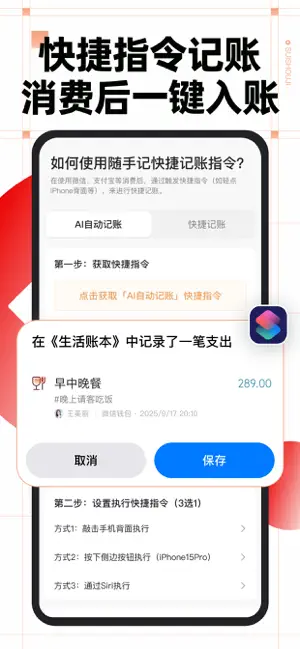
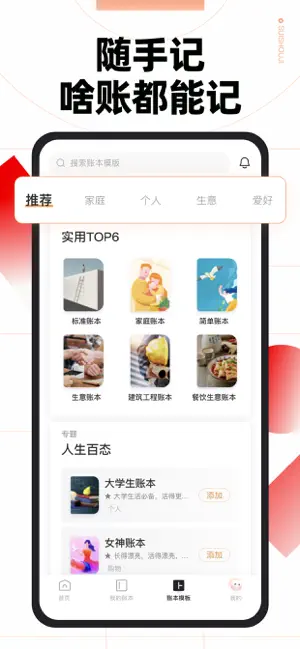
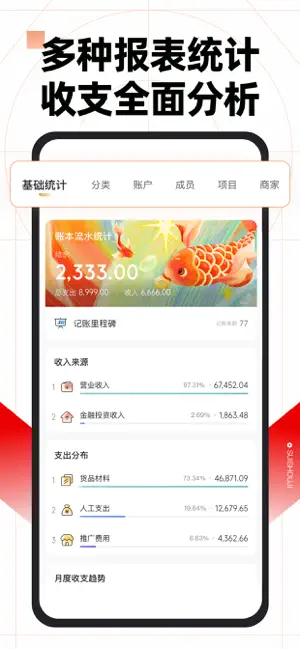
多赚会花每一天,记账就要随手记!海量账本模板,个人、家庭、生意账随心选。 记账快捷又专业,轻松管理多人记账。多维度账单解读,全面了解你的财务状况。 【特色亮点】 1、AI记账新体验 - 语音记账,开口就能记 - 图片识别批量记账,发送截图、小票自动记 - 快捷指令自动记账,消费后一键入账 2、记账看账一目了然 - 自定义记账键盘,快捷又专业 - 首页即报表,数据卡片及图表清晰呈现 - 多维度查看收支流水,搭配流水日历轻松补账 - 多账户管理,全面了解你的账户余额 3、多人协同,分工明确 - 多人共用一本账,家庭、团队协作更高效 - 角色权限可管理,员工记账老板看,权限分配专业严谨 4、安全可靠,功能丰富省心易用 - 云端存储多端同步,数据安全不丢失 - 账本操作必留痕,误删流水可恢复,安全又可靠 - 更有票据识别、预算、借贷中心等更多专业记账功能,一应俱全 【海量账本模板,陪伴你的各个人生阶段】 to成长中的你: - 高中生、大学生账本:生活费聪明花,课外兼职也能记 - 班费账本:班委管钱大家看,班费收支更透明 to工作中的你: - 差旅报销流水…
App details
What you can learn from 随手记-快捷自动记账
Every shipping app on the App Store has gone through the same decisions you're working through right now: which screenshot goes first, what caption sits over it, which device frame to show, what color the background should be. The 6 screenshots above are 随手记-快捷自动记账's answers to those questions — they're public, they're real, and they made it through Apple's review.
What the numbers say: 随手记-快捷自动记账 runs a light set with one background colour (#FCFCFC) carried across every screenshot — the listing reads as a single poster when the shots sit side by side in search results. The accent colour we picked up, #EC0404, is the one to reuse for badges, arrows and highlighted words if you borrow this look. Hit Use this style to open the editor with these exact colours and drop your own screenshot in.
Notice the first screenshot in particular. It's the one users see in search results and on the product page, and it's where most apps spend their best caption and tightest design. Look at the proportion of background to phone, where the text sits, what one thing the image is trying to communicate.
Want to see how other Finance apps approach the same problem? Browse more Finance apps in the showcase.
Take what works into your own screenshots
Open LaunchShots and design your App Store & Google Play screenshots — pick a device frame, drop captions, ship in minutes. Free, in your browser.
Open the screenshot editor →Apps with a similar look
Closest background + accent colours among the listings we've analysed — useful when you want to see the same palette handled by a different team.