Chart position — tracked daily by LaunchShots
Screenshot changes — detected by LaunchShots
Screenshot style breakdown
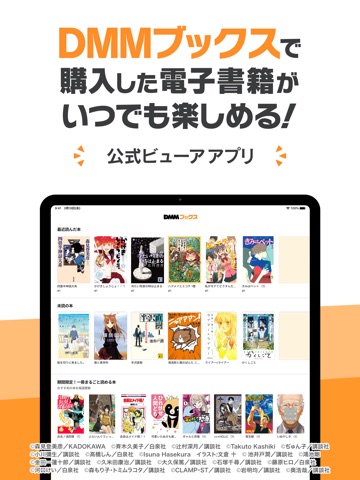
Sampled from 6 of DMMブックス 電子書籍リーダー's App Store screenshots — background, accent and theme, measured by LaunchShots (not something Apple publishes).
#FCFCFC bg
#DDDDDD
#FC942C accent
#111111 text
Screenshots


iPad screenshots


Icon palette
About this app
【DMMブックスについて】 DMMブックスは「DMM」で購入した「iPhone・iPad対応電子書籍」を閲覧するための公式ビューアアプリです。 「DMM」でご利用中のアカウントでログインするだけで、購入済みのマンガ・小説・写真集などが手軽に楽しめます。 話題の最新作から、ここでしか読めないオリジナル作品、絶版本など多彩なジャンルの電子書籍を取り揃えています。 【主な機能】 ・使いやすい本棚 シリーズ作品は自動でまとまります。 本が増えてしまっても、本棚を作成して簡単に整理する事ができます。 また、作成した本棚には鍵をかける事ができます。 ・読書を楽しむ便利機能 気になるページにしおりをつけることはもちろん、小説やラノベではマーカーをひいたり、文字の大きさを変えることができます。 他にも、見開き表示やフリック、タップ動作設定を自分の読書スタイルに変更! 自分好みに、一番見やすい環境へカスタマイズできます。 ・本を探す機能 読みたい本がすぐに見つかるキーワード検索やランキング、あなたへのおすすめなどから気になる作品を見つ…
App details
What you can learn from DMMブックス 電子書籍リーダー
Every shipping app on the App Store has gone through the same decisions you're working through right now: which screenshot goes first, what caption sits over it, which device frame to show, what color the background should be. The 11 screenshots above are DMMブックス 電子書籍リーダー's answers to those questions — they're public, they're real, and they made it through Apple's review.
What the numbers say: DMMブックス 電子書籍リーダー runs a light set with one background colour (#FCFCFC) carried across every screenshot — the listing reads as a single poster when the shots sit side by side in search results. The accent colour we picked up, #FC942C, is the one to reuse for badges, arrows and highlighted words if you borrow this look. Hit Use this style to open the editor with these exact colours and drop your own screenshot in.
Notice the first screenshot in particular. It's the one users see in search results and on the product page, and it's where most apps spend their best caption and tightest design. Look at the proportion of background to phone, where the text sits, what one thing the image is trying to communicate.
Want to see how other Book apps approach the same problem? Browse more Book apps in the showcase.
Take what works into your own screenshots
Open LaunchShots and design your App Store & Google Play screenshots — pick a device frame, drop captions, ship in minutes. Free, in your browser.
Open the screenshot editor →Apps with a similar look
Closest background + accent colours among the listings we've analysed — useful when you want to see the same palette handled by a different team.