Chart position — tracked daily by LaunchShots
Screenshot changes — detected by LaunchShots
Screenshot style breakdown
Sampled from 6 of モチタン-AI英単語ゲーム/英語/韓国語/中国語/フランス語's App Store screenshots — background, accent and theme, measured by LaunchShots (not something Apple publishes).
#FCFCFC bg
#DDDDDD
#046C94 accent
#111111 text
Screenshots


iPad screenshots


Icon palette
About this app
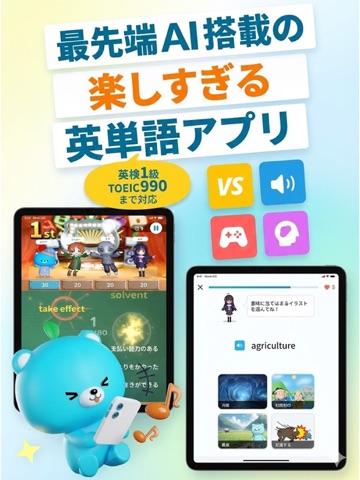
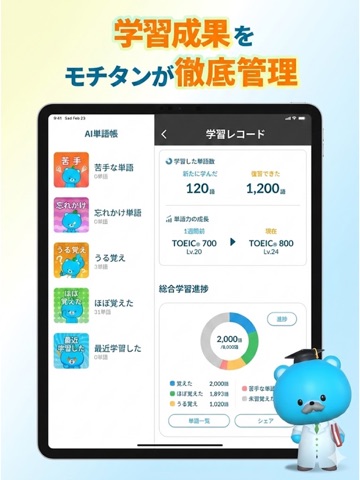
「あと一戦だけ」で、わかる言葉が増えていく。 さっきは間違えた単語に、今度はすぐ答えられた。 勝てたうれしさに、自分が覚えていたうれしさが重なる。モチタンで届けたいのは、そんな瞬間です。 モチタンは、50秒の対戦や冒険で学べる英単語・語学学習アプリ。英語・韓国語・中国語・フランス語・ドイツ語・スペイン語の6言語に対応しています。 英検®やTOEIC®に向けた勉強も、好きになった国の言葉も。毎日の小さな「もう一回」から始めてみませんか。 ■ 50秒。知っている単語が、勝負を変える 全国のプレイヤーや友だちと、単語クイズでリアルタイム対戦。限られた時間の中で、次々に問題へ答えていきます。 「あれ、なんだっけ」と迷った言葉ほど、答えを見たあとも気になる。次に出てきたら、今度こそ答えたい。対戦で生まれたその気持ちを、次の学習につなげます。 一戦は50秒。通学・通勤の合間や、ちょっとした待ち時間にも遊べます。 ■ 好きになった、その先の言葉を 韓国ドラマで何度も聞く言葉。中国語で書かれた旅先のメニュー。フランス語の歌の…
App details
What you can learn from モチタン-AI英単語ゲーム/英語/韓国語/中国語/フランス語
Every shipping app on the App Store has gone through the same decisions you're working through right now: which screenshot goes first, what caption sits over it, which device frame to show, what color the background should be. The 20 screenshots above are モチタン-AI英単語ゲーム/英語/韓国語/中国語/フランス語's answers to those questions — they're public, they're real, and they made it through Apple's review.
What the numbers say: モチタン-AI英単語ゲーム/英語/韓国語/中国語/フランス語 runs a light set where the background shifts from screenshot to screenshot (first shot #FCFCFC) — each image has to stand on its own, so the captions carry more of the story. The accent colour we picked up, #046C94, is the one to reuse for badges, arrows and highlighted words if you borrow this look. Hit Use this style to open the editor with these exact colours and drop your own screenshot in.
Notice the first screenshot in particular. It's the one users see in search results and on the product page, and it's where most apps spend their best caption and tightest design. Look at the proportion of background to phone, where the text sits, what one thing the image is trying to communicate.
Want to see how other Education apps approach the same problem? Browse more Education apps in the showcase.
Take what works into your own screenshots
Open LaunchShots and design your App Store & Google Play screenshots — pick a device frame, drop captions, ship in minutes. Free, in your browser.
Open the screenshot editor →Apps with a similar look
Closest background + accent colours among the listings we've analysed — useful when you want to see the same palette handled by a different team.