Chart position — tracked daily by LaunchShots
Screenshot changes — detected by LaunchShots
Screenshot style breakdown
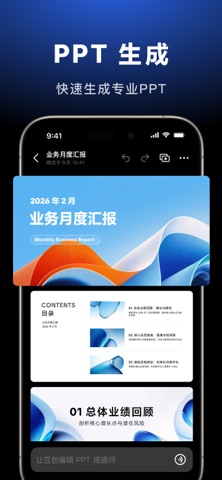
Sampled from 6 of 豆包 - 生活工作 AI 助手's App Store screenshots — background, accent and theme, measured by LaunchShots (not something Apple publishes).
#04040C bg
#27272E
#648CCC accent
#FFFFFF text
Screenshots




iPad screenshots


Icon palette
About this app
豆包是随时帮忙的 AI 助手。看不懂的信息它能解释,遇到疑问随时提问,想做一道菜、了解新概念或获取灵感,都能快速得到清晰答案;无论是查资料、规划出行还是安排生活,豆包都能抓住重点,把复杂问题变简单。 在学习和工作中,豆包可以讲解题目、批改作业、拆解知识点,也能总结资料、分析数据、写代码,并生成文档和 PPT,高效完成报告和项目。在工作任务模式下,可以开启智能化的自动办公体验,内置 Office 和专业技能,理解需求、自动执行,还支持定时任务,复杂工作一键托管。 想表达创意?通过「豆包 P 图」用说话就能快速修图和编辑图片,一句话完成换背景、风格转换或创意改图;它同样支持图片和视频生成,基于 Seedance 模型轻松制作具有大片质感的视频,让创意直观呈现。 豆包配备先进语音输入和语音通话,识别准确、响应自然,对话流畅;结合拍照识图,你可以用最直观的方式获取信息。打开就能问,随时得到帮助。 豆包的特色 → ■ 简单清爽的界面设计 ■ 强大的联网搜索能力 ■ 便捷而且准确的语音输入 ■ 自然且接近人声的语音输出 ■ 工作任务模式,开启…
App details
What you can learn from 豆包 - 生活工作 AI 助手
Every shipping app on the App Store has gone through the same decisions you're working through right now: which screenshot goes first, what caption sits over it, which device frame to show, what color the background should be. The 19 screenshots above are 豆包 - 生活工作 AI 助手's answers to those questions — they're public, they're real, and they made it through Apple's review.
What the numbers say: 豆包 - 生活工作 AI 助手 runs a dark set with one background colour (#04040C) carried across every screenshot — the listing reads as a single poster when the shots sit side by side in search results. The accent colour we picked up, #648CCC, is the one to reuse for badges, arrows and highlighted words if you borrow this look. Hit Use this style to open the editor with these exact colours and drop your own screenshot in.
Notice the first screenshot in particular. It's the one users see in search results and on the product page, and it's where most apps spend their best caption and tightest design. Look at the proportion of background to phone, where the text sits, what one thing the image is trying to communicate.
Want to see how other Productivity apps approach the same problem? Browse more Productivity apps in the showcase.
Take what works into your own screenshots
Open LaunchShots and design your App Store & Google Play screenshots — pick a device frame, drop captions, ship in minutes. Free, in your browser.
Open the screenshot editor →Apps with a similar look
Closest background + accent colours among the listings we've analysed — useful when you want to see the same palette handled by a different team.