Chart position — tracked daily by LaunchShots
Screenshot style breakdown
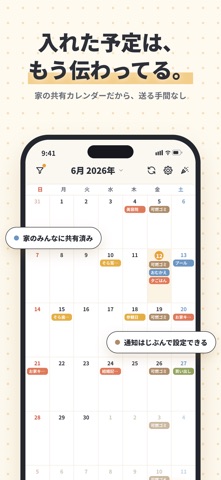
Sampled from 6 of ienon 家族・夫婦・カップルでカレンダー・家計簿を共有's App Store screenshots — background, accent and theme, measured by LaunchShots (not something Apple publishes).
#FCFCEC bg
#DDDDCF
#F4CC8C accent
#111111 text
Reading the caption text from the screenshots in your browser…
Screenshots



Icon palette
About this app
「大切な人との日常をより結びつけるオールインワンアプリienon(いえのん)」 ienonは、家族や恋人など一緒に暮らす大切な人との日常をより結びつけ、絆を深める、「家」のオールインワンアプリです。 ◯一緒に暮らす家族と恋人と共有する「家」のアプリ 同じグループのメンバーとienonの全ての機能を共有することができます。(プライベート機能を除く) ◯オールインワン共有アプリ ienonでは、カレンダー、買い物リスト、家計簿、通話、チャット、ノート(レシピ、メモなど…)、To-doリスト、記念日、気分記録、家事管理、献立・レシピ、在庫管理リスト(※プレミアム限定機能)が1つのアプリに詰まっており全て共有することができます。 ienonは多機能アプリですが、どの機能も大切な人との日常をより結びつけるという目的を持っています。カレンダーで予定を共有し、伝言板でコミュニケーションを取り、家計簿で一緒に家計を管理するなど、これらすべてが、日々の小さなつながりを大切にする想いから生まれています。 全ての機能を使わなくてもOK!ライフスタイ…
App details
What you can learn from ienon 家族・夫婦・カップルでカレンダー・家計簿を共有
Every shipping app on the App Store has gone through the same decisions you're working through right now: which screenshot goes first, what caption sits over it, which device frame to show, what color the background should be. The 8 screenshots above are ienon 家族・夫婦・カップルでカレンダー・家計簿を共有's answers to those questions — they're public, they're real, and they made it through Apple's review.
What the numbers say: ienon 家族・夫婦・カップルでカレンダー・家計簿を共有 runs a light set with one background colour (#FCFCEC) carried across every screenshot — the listing reads as a single poster when the shots sit side by side in search results. The accent colour we picked up, #F4CC8C, is the one to reuse for badges, arrows and highlighted words if you borrow this look. Hit Use this style to open the editor with these exact colours and drop your own screenshot in.
Notice the first screenshot in particular. It's the one users see in search results and on the product page, and it's where most apps spend their best caption and tightest design. Look at the proportion of background to phone, where the text sits, what one thing the image is trying to communicate.
Want to see how other Productivity apps approach the same problem? Browse more Productivity apps in the showcase.
Take what works into your own screenshots
Open LaunchShots and design your App Store & Google Play screenshots — pick a device frame, drop captions, ship in minutes. Free, in your browser.
Open the screenshot editor →Apps with a similar look
Closest background + accent colours among the listings we've analysed — useful when you want to see the same palette handled by a different team.