Chart position — tracked daily by LaunchShots
Screenshot style breakdown
Sampled from 5 of ゼビオグループ公式アプリ's App Store screenshots — background, accent and theme, measured by LaunchShots (not something Apple publishes).
#FCFCFC bg
#DDDDDD
#04449C accent
#111111 text
Screenshots



Icon palette
About this app
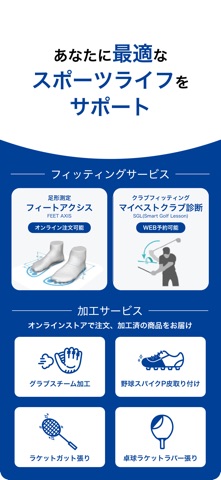
ゼビオグループ公式アプリは、大型スポーツ・ゴルフ・アウトドア専門店の総合お買い物アプリです。国内最大級の品ぞろえとスポーツポイントが貯まる・使えるアプリとして、公式オンラインストア(通販)でのお買い物や、店舗のお得な情報や在庫チェック、会員証としてお使いいただけます。 【アプリでできること】 ▶公式オンラインストアの「マイリスト設定」で自分だけの新着情報をゲット スーパースポーツゼビオ、ヴィクトリアゴルフ、エルブレス、ヴィクトリアの公式オンラインストアでは、あなたのよく購入するスポーツ・カテゴリー、ブランドを「マイリスト」に設定することができます。設定すると、トップページにあなたが選んだ設定のショートカットボタンや、あなた専用の新着情報が表示されるようになります。 ▶店舗では会員証(バーコード)をスマホで表示 毎回ログイン不要で、会員証(バーコード)を表示可能になりました。そのほか、店舗にて公式オンラインストアの在庫をバーコードで確認後、オーダーも可能です。 ▶フィッティングサービスや加工サ…
App details
What you can learn from ゼビオグループ公式アプリ
Every shipping app on the App Store has gone through the same decisions you're working through right now: which screenshot goes first, what caption sits over it, which device frame to show, what color the background should be. The 5 screenshots above are ゼビオグループ公式アプリ's answers to those questions — they're public, they're real, and they made it through Apple's review.
What the numbers say: ゼビオグループ公式アプリ runs a light set with one background colour (#FCFCFC) carried across every screenshot — the listing reads as a single poster when the shots sit side by side in search results. The accent colour we picked up, #04449C, is the one to reuse for badges, arrows and highlighted words if you borrow this look. Hit Use this style to open the editor with these exact colours and drop your own screenshot in.
Notice the first screenshot in particular. It's the one users see in search results and on the product page, and it's where most apps spend their best caption and tightest design. Look at the proportion of background to phone, where the text sits, what one thing the image is trying to communicate.
Want to see how other Sports apps approach the same problem? Browse more Sports apps in the showcase.
Take what works into your own screenshots
Open LaunchShots and design your App Store & Google Play screenshots — pick a device frame, drop captions, ship in minutes. Free, in your browser.
Open the screenshot editor →Apps with a similar look
Closest background + accent colours among the listings we've analysed — useful when you want to see the same palette handled by a different team.