Screenshot changes — detected by LaunchShots
Screenshot style breakdown
Sampled from 5 of ملفاتي | My Files's App Store screenshots — background, accent and theme, measured by LaunchShots (not something Apple publishes).
#040404 bg
#272727
#54ACDC accent
#FFFFFF text
Reading the caption text from the screenshots in your browser…
Screenshots


iPad screenshots


Icon palette
About this app
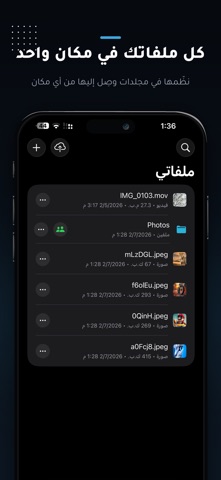
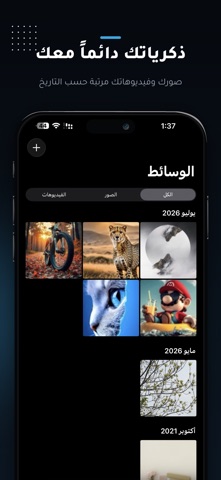
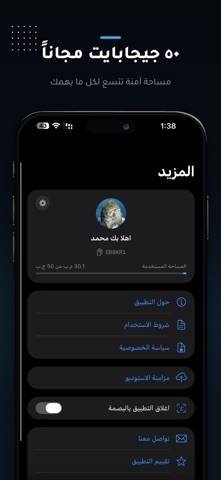
مساحتك الآمنة لكل ملفاتك ، صورك وفيديوهاتك ومستنداتك في مكان واحد، تصل إليها من أي مكان وفي أي وقت. ارفع ملفاتك ونظمها في مجلدات، وزامن استوديو جهازك بالكامل تلقائيًا، وشارك ما تريد مع من تريد بصلاحيات تتحكم فيها أنت ، واحتفظ بذكرياتك محفوظة حتى لو فُقد جهازك أو تعطل. مساحة تخزين مجانية 50 جيجابايت لكل مستخدم. مزامنة الاستوديو: نسخ احتياطي تلقائي لصورك وفيديوهاتك، يستأنف من حيث توقف ولا يكرر أي ملف مشاركة ذكية: شارك ملفًا أو مجلدًا كاملاً مع مستخدم آخر عبر معرّفه، وحدد صلاحياته بدقة ، رفع، حذف، تعديل أسماء، أو إعادة مشاركة مجلدات مشتركة متزامنة: كل ما يُضاف للمجلد يظهر لجميع المشاركين فورًا، مع اسم من رفع كل ملف خصوصية أولاً: ملفاتك لا يطّلع عليها أحد سواك، ولا تصل لأحد إلا إذا شاركتها بنفسك قفل التطبيق ببصمة الوجه أو الإصبع قفل المجلدات الحساسة بكلمة مرور رفع صورة أو فيديو على رابط مباشر للمشاركة في أي مكان تنزيل ملفاتك للوصول إليها بدون إنترنت أدوات إضافية: اختصار الروابط، قارئ وصانع…
App details
What you can learn from ملفاتي | My Files
Every shipping app on the App Store has gone through the same decisions you're working through right now: which screenshot goes first, what caption sits over it, which device frame to show, what color the background should be. The 8 screenshots above are ملفاتي | My Files's answers to those questions — they're public, they're real, and they made it through Apple's review.
What the numbers say: ملفاتي | My Files runs a dark set with one background colour (#040404) carried across every screenshot — the listing reads as a single poster when the shots sit side by side in search results. The accent colour we picked up, #54ACDC, is the one to reuse for badges, arrows and highlighted words if you borrow this look. Hit Use this style to open the editor with these exact colours and drop your own screenshot in.
Notice the first screenshot in particular. It's the one users see in search results and on the product page, and it's where most apps spend their best caption and tightest design. Look at the proportion of background to phone, where the text sits, what one thing the image is trying to communicate.
Want to see how other Productivity apps approach the same problem? Browse more Productivity apps in the showcase.
Take what works into your own screenshots
Open LaunchShots and design your App Store & Google Play screenshots — pick a device frame, drop captions, ship in minutes. Free, in your browser.
Open the screenshot editor →Apps with a similar look
Closest background + accent colours among the listings we've analysed — useful when you want to see the same palette handled by a different team.