Chart position — tracked daily by LaunchShots
Screenshot style breakdown
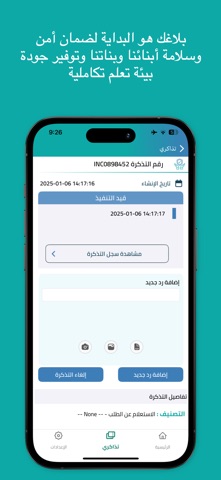
Sampled from 3 of الدعم الموحد's App Store screenshots — background, accent and theme, measured by LaunchShots (not something Apple publishes).
#ECFCFC bg
#CFDDDD
#149CAC accent
#111111 text
Reading the caption text from the screenshots in your browser…
Screenshots


iPad screenshots


Icon palette
About this app
يقدم تطبيق "الدعم الموحد" (USC) تجربة موحدة وشاملة تهدف إلى تسهيل تقديم بلاغات الخدمات لجميع المستخدمين من خلال منصة واحدة. يتميز التطبيق بمجموعة من الخصائص التي تلبي احتياجات المستخدمين بكفاءة، وتشمل: تقديم الطلبات وتتبع حالتها بشكل مباشر وسريع. الدعم الفوري عبر فرق متخصصة لضمان الحلول السريعة. خدمة عملاء مُدارة بكفاءة لتعزيز تجربة المستخدم. بفضل واجهته البسيطة وتصميمه الذي يناسب جميع الفئات، يسعى التطبيق إلى تحسين كفاءة العمليات وتوفير الوقت والجهد للمستفيدين، مما يجعله أداة أساسية لدعم منظومة التعليم.
App details
What you can learn from الدعم الموحد
Every shipping app on the App Store has gone through the same decisions you're working through right now: which screenshot goes first, what caption sits over it, which device frame to show, what color the background should be. The 6 screenshots above are الدعم الموحد's answers to those questions — they're public, they're real, and they made it through Apple's review.
What the numbers say: الدعم الموحد runs a mixed light-and-dark set where the background shifts from screenshot to screenshot (first shot #ECFCFC) — each image has to stand on its own, so the captions carry more of the story. The accent colour we picked up, #149CAC, is the one to reuse for badges, arrows and highlighted words if you borrow this look. Hit Use this style to open the editor with these exact colours and drop your own screenshot in.
Notice the first screenshot in particular. It's the one users see in search results and on the product page, and it's where most apps spend their best caption and tightest design. Look at the proportion of background to phone, where the text sits, what one thing the image is trying to communicate.
Want to see how other Education apps approach the same problem? Browse more Education apps in the showcase.
Take what works into your own screenshots
Open LaunchShots and design your App Store & Google Play screenshots — pick a device frame, drop captions, ship in minutes. Free, in your browser.
Open the screenshot editor →Apps with a similar look
Closest background + accent colours among the listings we've analysed — useful when you want to see the same palette handled by a different team.