Chart position — tracked daily by LaunchShots
Screenshot style breakdown
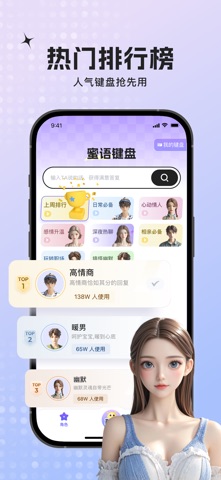
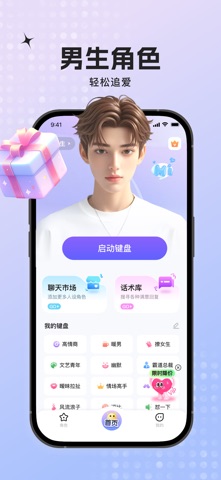
Sampled from 6 of 蜜语键盘-AI高情商恋爱键盘输入法&聊天对话恋爱话术回复神器's App Store screenshots — background, accent and theme, measured by LaunchShots (not something Apple publishes).
#ACC4FC bg
#97ACDD
#7464FC accent
#111111 text
Screenshots



Icon palette
About this app
社交聊天不知道如何回复会发愁吗? 谈恋爱时不知如何巧妙回应心动对象? 职场面对领导临时安排加班也手足无措? 蜜语键盘AI智能聊天键盘输入法软件,为解决你社交难题而生! 【恋爱助攻】担心恋爱聊天冷场尴尬?只需复制对方话语,一键就能生成完美回复,让恋爱聊天甜蜜不卡顿; 【职场神器】初入职场不知如何破冰?会议发言陷入僵局,蜜语键盘化身高情商助手,助职场社恐也能游刃有余; 【角色切换】高情商、幽默搞笑、温柔深情、专业严谨等风格随心切换,适配各类场景对话,回复总能恰到好处; 【智能助手】有话在心口难开?输入或复制内容,即刻完成智能润色,让表达更优雅得体。 蜜语键盘懂你所有社交焦虑,是你贴心聊天高情商助手,助你轻松化解各种社交困境! 选择蜜语键盘的3大理由: 【高效迅捷】秒速生成多元回复,让纠结、拖延、冷场成为过去式; 【趣味十足】精准贴合场景需求,让你的每一次发言都亮点满满; 【场景全覆盖】恋爱、职场、日常社交等各类场景,蜜语键盘都能为你保驾护航。 无论是追求浪漫爱情、冲刺职场巅峰,还是享受日常社交乐趣…
App details
What you can learn from 蜜语键盘-AI高情商恋爱键盘输入法&聊天对话恋爱话术回复神器
Every shipping app on the App Store has gone through the same decisions you're working through right now: which screenshot goes first, what caption sits over it, which device frame to show, what color the background should be. The 6 screenshots above are 蜜语键盘-AI高情商恋爱键盘输入法&聊天对话恋爱话术回复神器's answers to those questions — they're public, they're real, and they made it through Apple's review.
What the numbers say: 蜜语键盘-AI高情商恋爱键盘输入法&聊天对话恋爱话术回复神器 runs a light set where the background shifts from screenshot to screenshot (first shot #ACC4FC) — each image has to stand on its own, so the captions carry more of the story. The accent colour we picked up, #7464FC, is the one to reuse for badges, arrows and highlighted words if you borrow this look. Hit Use this style to open the editor with these exact colours and drop your own screenshot in.
Notice the first screenshot in particular. It's the one users see in search results and on the product page, and it's where most apps spend their best caption and tightest design. Look at the proportion of background to phone, where the text sits, what one thing the image is trying to communicate.
Want to see how other Reference apps approach the same problem? Browse more Reference apps in the showcase.
Take what works into your own screenshots
Open LaunchShots and design your App Store & Google Play screenshots — pick a device frame, drop captions, ship in minutes. Free, in your browser.
Open the screenshot editor →Apps with a similar look
Closest background + accent colours among the listings we've analysed — useful when you want to see the same palette handled by a different team.