Screenshot style breakdown
Sampled from 5 of Talelynx's App Store screenshots — background, accent and theme, measured by LaunchShots (not something Apple publishes).
#F4FCF4 bg
#D6DDD6
#040454 accent
#111111 text
Screenshots


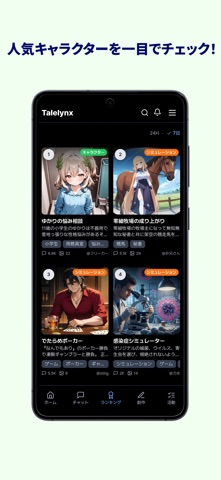

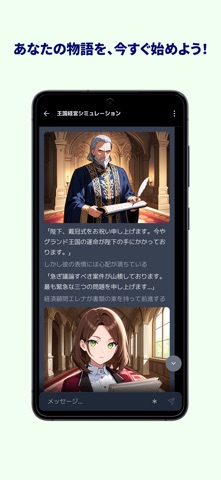
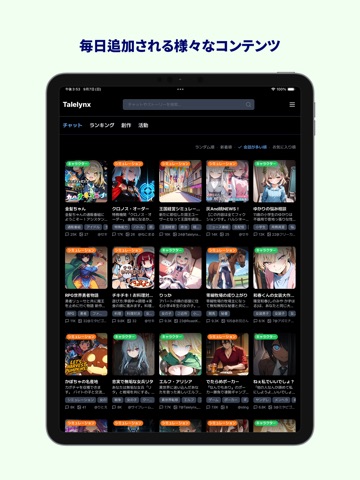
iPad screenshots



Icon palette
About this app
物語がはじまるAIチャット! 1. さまざまなキャラクターやシミュレーションと出会おう! 毎日更新される新しいキャラクターやシミュレーションが、あなたを待っています! 2. 自由なAIチャット! 用意されたシナリオで自由に会話してみましょう。 どんな選択をするかはあなた次第! あなたの選択によって物語の展開が変わります。 3. AIチャットが初めてでも安心! 選択肢で進めよう 各会話ごとに3つの選択肢が自動生成されます。 どう進めればいいかわからない時は、選択肢を使ってみてください。 4. かんたん&確実なチャット作成 あなた専用のキャラクターやシミュレーションを作ってみましょう。 何をすればいいかステップごとに確認できます。 慣れていない場合はAIがサポートします。 5. 自由なフィードバックでより良い体験を Talelynxはユーザーの声をもとに進化し続けます。 改善点があれば、いつでもお気軽にお知らせください! Terms of Use (EULA): https://www.apple.com/legal/internet-services/itunes/dev/stdeula/
App details
What you can learn from Talelynx
Every shipping app on the App Store has gone through the same decisions you're working through right now: which screenshot goes first, what caption sits over it, which device frame to show, what color the background should be. The 10 screenshots above are Talelynx's answers to those questions — they're public, they're real, and they made it through Apple's review.
What the numbers say: Talelynx runs a light set with one background colour (#F4FCF4) carried across every screenshot — the listing reads as a single poster when the shots sit side by side in search results. The accent colour we picked up, #040454, is the one to reuse for badges, arrows and highlighted words if you borrow this look. Hit Use this style to open the editor with these exact colours and drop your own screenshot in.
Notice the first screenshot in particular. It's the one users see in search results and on the product page, and it's where most apps spend their best caption and tightest design. Look at the proportion of background to phone, where the text sits, what one thing the image is trying to communicate.
Want to see how other Entertainment apps approach the same problem? Browse more Entertainment apps in the showcase.
Take what works into your own screenshots
Open LaunchShots and design your App Store & Google Play screenshots — pick a device frame, drop captions, ship in minutes. Free, in your browser.
Open the screenshot editor →Apps with a similar look
Closest background + accent colours among the listings we've analysed — useful when you want to see the same palette handled by a different team.