Chart position — tracked daily by LaunchShots
Screenshot style breakdown
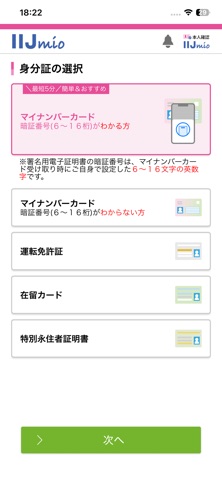
Sampled from 4 of 本人確認 for IIJmio's App Store screenshots — background, accent and theme, measured by LaunchShots (not something Apple publishes).
#FCFCFC bg
#DDDDDD
#74B42C accent
#111111 text
Screenshots



Icon palette
About this app
「本人確認 for IIJmio」アプリは、IIJmioを契約する際に、本人確認手続きを行うためのアプリです。 2026年1月中旬より開始する、マイナンバーカードを利用した公的個人認証サービス方式(JPKI方式)、およびICチップ読取+容貌画像方式による本人確認手続きに対応しています。 本アプリは、IIJmioのWebサイトで申込完了後に本人確認手続きを開始し、Webサイトからアプリが呼び出されることでご利用いただけます。 ※本アプリ単独ではご利用いただけません。 ■IIJmio https://www.iijmio.jp/ ■「本人確認 for IIJmio」アプリの主な機能 1.本人確認書類の選択とICチップ読取 本人確認書類の暗証番号や認証情報を入力し、スマートフォンでICチップの情報を読み取ります。 2.顔の撮影 その後顔の撮影を行い、本人確認完了です。 ※マイナンバーカードを利用した公的個人認証サービス方式(JPKI方式)の場合、顔の撮影は不要です。 ■IIJmioの本人確認手続きについて http://iijm.io/id ■@iijmioのご案内 https://x.com/iijmio IIJmioの公式Xアカウントです…
App details
What you can learn from 本人確認 for IIJmio
Every shipping app on the App Store has gone through the same decisions you're working through right now: which screenshot goes first, what caption sits over it, which device frame to show, what color the background should be. The 4 screenshots above are 本人確認 for IIJmio's answers to those questions — they're public, they're real, and they made it through Apple's review.
What the numbers say: 本人確認 for IIJmio runs a light set with one background colour (#FCFCFC) carried across every screenshot — the listing reads as a single poster when the shots sit side by side in search results. The accent colour we picked up, #74B42C, is the one to reuse for badges, arrows and highlighted words if you borrow this look. Hit Use this style to open the editor with these exact colours and drop your own screenshot in.
Notice the first screenshot in particular. It's the one users see in search results and on the product page, and it's where most apps spend their best caption and tightest design. Look at the proportion of background to phone, where the text sits, what one thing the image is trying to communicate.
Want to see how other Utilities apps approach the same problem? Browse more Utilities apps in the showcase.
Take what works into your own screenshots
Open LaunchShots and design your App Store & Google Play screenshots — pick a device frame, drop captions, ship in minutes. Free, in your browser.
Open the screenshot editor →Apps with a similar look
Closest background + accent colours among the listings we've analysed — useful when you want to see the same palette handled by a different team.