Chart position — tracked daily by LaunchShots
Screenshot changes — detected by LaunchShots
Screenshot style breakdown
Sampled from 3 of 微商刷圈图-营销做图生成's App Store screenshots — background, accent and theme, measured by LaunchShots (not something Apple publishes).
#FCECFC bg
#DDCFDD
#F4A444 accent
#111111 text
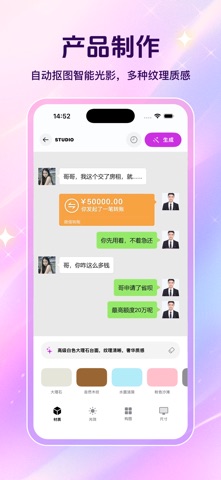
- #1产品 制作 自动 抠 图 智能 光影 , 多 种 纹理 质感
- #2虚拟 影 棚 高 清 营销 场景 图 , 无 需 专业 摄影 14:39 [ 全
- #3制作 记录 批量 图 片 处 理 , 简 化 产品 物料
Captions read from the screenshots (OCR, may contain small errors): 3 headlines, 13.3 words on average (longest 16).
Screenshots


Icon palette
About this app
微商刷圈图-营销做图生成 AI产品图制作:输入产品图,智能生成多种风格的高清营销场景图,无需专业摄影。 营销文案生成:根据产品特点,一键生成适合朋友圈、小红书等平台的种草文案。 批量图片处理:支持批量添加防盗水印、修改尺寸,高效保护原创,提升出图效率。 我们致力于通过AI技术,简化营销物料制作流程,让生意推广更轻松。 ************************************************************************ 微商刷圈图 会员说明 订阅服务: 1:微商刷圈图周会员 (1周) 2:微商刷圈图周会员 (1月) 3:微商刷圈图年会员 (1年) 4:微商刷圈图永久会员 (永久) 订阅价格: 1:连续包周,价格为(18元/周) 2:连续包月,价格为 (38元/年) 3:连续包年,价格为 (108元/年) 4:永久会员,价格为(128元/永久) 关于自动续费说明: 使用权限:本会员公支持苹果端使用; 付款:确认购买,即从苹果iTunes账号扣款; 续费:到期前24小时,苹果自动从iTunes账号中扣费并延长会员期; …
App details
What you can learn from 微商刷圈图-营销做图生成
Every shipping app on the App Store has gone through the same decisions you're working through right now: which screenshot goes first, what caption sits over it, which device frame to show, what color the background should be. The 3 screenshots above are 微商刷圈图-营销做图生成's answers to those questions — they're public, they're real, and they made it through Apple's review.
What the numbers say: 微商刷圈图-营销做图生成 runs a light set with one background colour (#FCECFC) carried across every screenshot — the listing reads as a single poster when the shots sit side by side in search results. The accent colour we picked up, #F4A444, is the one to reuse for badges, arrows and highlighted words if you borrow this look. Hit Use this style to open the editor with these exact colours and drop your own screenshot in.
Notice the first screenshot in particular. It's the one users see in search results and on the product page, and it's where most apps spend their best caption and tightest design. Look at the proportion of background to phone, where the text sits, what one thing the image is trying to communicate.
Want to see how other Graphics & Design apps approach the same problem? Browse more Graphics & Design apps in the showcase.
Take what works into your own screenshots
Open LaunchShots and design your App Store & Google Play screenshots — pick a device frame, drop captions, ship in minutes. Free, in your browser.
Open the screenshot editor →Apps with a similar look
Closest background + accent colours among the listings we've analysed — useful when you want to see the same palette handled by a different team.