Chart position — tracked daily by LaunchShots
Screenshot style breakdown
Sampled from 4 of 芽芽乐章 - 萌芽的四季乐章's App Store screenshots — background, accent and theme, measured by LaunchShots (not something Apple publishes).
#E4F4FC bg
#C8D6DD
#04A4FC accent
#111111 text
Screenshots


Icon palette
About this app
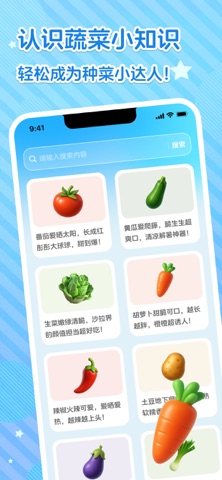
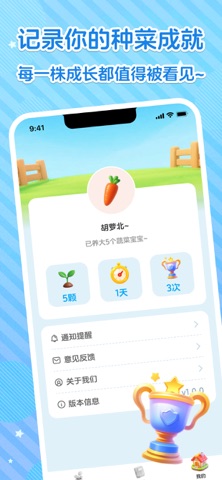
欢迎来到芽芽乐章——超可爱蔬菜拟人化养成小花园! 这里每一颗小蔬菜都有自己的小名字、出生证件照和超萌性格! 小红番(番茄)爱晒太阳、渴望长成大红球; 小黄瓜爱清凉、脆生生超解暑; 胡萝卜小胖墩甜到齁、越吃越上头…… 每天只需点点手指: 晒太阳补充光照 浇水让它开心喝饱 施肥加速快乐成长 修剪枝叶保持元气满满 健康度爆表时,小蔬菜会露出超级满足的笑脸! 记录每一天的成长轨迹,和蔬菜宝宝一起从种子→小苗→结果实,解锁更多萌系蔬菜伙伴~ 适合大人解压、孩子认识蔬菜、培养不挑食好习惯。
App details
What you can learn from 芽芽乐章 - 萌芽的四季乐章
Every shipping app on the App Store has gone through the same decisions you're working through right now: which screenshot goes first, what caption sits over it, which device frame to show, what color the background should be. The 4 screenshots above are 芽芽乐章 - 萌芽的四季乐章's answers to those questions — they're public, they're real, and they made it through Apple's review.
What the numbers say: 芽芽乐章 - 萌芽的四季乐章 runs a light set where the background shifts from screenshot to screenshot (first shot #E4F4FC) — each image has to stand on its own, so the captions carry more of the story. The accent colour we picked up, #04A4FC, is the one to reuse for badges, arrows and highlighted words if you borrow this look. Hit Use this style to open the editor with these exact colours and drop your own screenshot in.
Notice the first screenshot in particular. It's the one users see in search results and on the product page, and it's where most apps spend their best caption and tightest design. Look at the proportion of background to phone, where the text sits, what one thing the image is trying to communicate.
Want to see how other Utilities apps approach the same problem? Browse more Utilities apps in the showcase.
Take what works into your own screenshots
Open LaunchShots and design your App Store & Google Play screenshots — pick a device frame, drop captions, ship in minutes. Free, in your browser.
Open the screenshot editor →Apps with a similar look
Closest background + accent colours among the listings we've analysed — useful when you want to see the same palette handled by a different team.