Chart position — tracked daily by LaunchShots
Screenshot style breakdown
Sampled from 5 of PixelPot - 歩数で育てる植物アプリ's App Store screenshots — background, accent and theme, measured by LaunchShots (not something Apple publishes).
#243424 bg
#425042
#64742C accent
#FFFFFF text
Screenshots


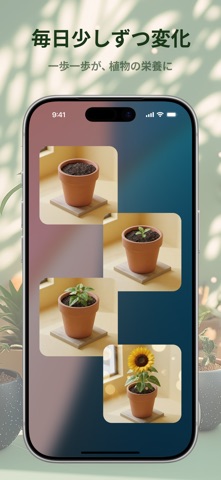
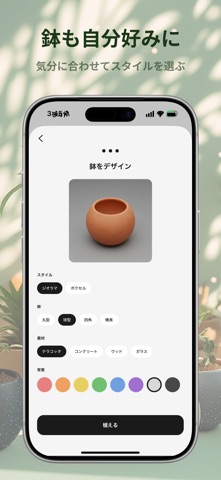
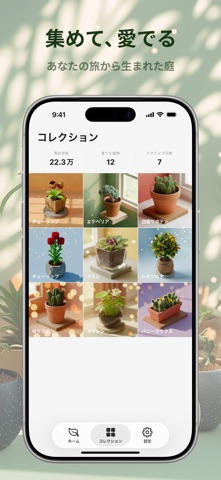
Icon palette
About this app
歩いた分だけ、植物が育つ。PixelPotは、毎日の歩数をリアルな植物の成長に変える育成型の歩数計アプリです。ホーム画面ウィジェットに置けば、歩くたびに少しずつ育っていく様子をいつでも眺められます。 種を選んで植えたら、あとはいつも通り過ごすだけ。歩数に応じて植物が芽吹き、葉を広げ、やがて花を咲かせます。銀のタネ・金のタネではAIが一株ごとにユニークなイラストを生成するので、同じ植物は二つとありません。 主な機能 - 自動歩数トラッキング: Apple HealthKitと連携して歩数を自動カウント - ホーム画面ウィジェット: ウィジェットで植物の成長をリアルタイムに確認 - 3種類のタネ: 普通のタネ・銀のタネ・金のタネの3種。銀と金ではAIが毎回異なる植物を描き出します。金のタネはより自由度が高く、個性的な一株が生まれます - 5段階の成長: 種まきから発芽、苗、開花、満開へと段階的に変化 - コレクション: 育て上げた植物をコレクションに保存 - 鉢のカスタマイズ: 形・素材・スタイルを選んで自分好みに - 花言葉と花知識: 育てた植物の花…
App details
What you can learn from PixelPot - 歩数で育てる植物アプリ
Every shipping app on the App Store has gone through the same decisions you're working through right now: which screenshot goes first, what caption sits over it, which device frame to show, what color the background should be. The 5 screenshots above are PixelPot - 歩数で育てる植物アプリ's answers to those questions — they're public, they're real, and they made it through Apple's review.
What the numbers say: PixelPot - 歩数で育てる植物アプリ runs a mixed light-and-dark set where the background shifts from screenshot to screenshot (first shot #243424) — each image has to stand on its own, so the captions carry more of the story. The accent colour we picked up, #64742C, is the one to reuse for badges, arrows and highlighted words if you borrow this look. Hit Use this style to open the editor with these exact colours and drop your own screenshot in.
Notice the first screenshot in particular. It's the one users see in search results and on the product page, and it's where most apps spend their best caption and tightest design. Look at the proportion of background to phone, where the text sits, what one thing the image is trying to communicate.
Want to see how other Health & Fitness apps approach the same problem? Browse more Health & Fitness apps in the showcase.
Take what works into your own screenshots
Open LaunchShots and design your App Store & Google Play screenshots — pick a device frame, drop captions, ship in minutes. Free, in your browser.
Open the screenshot editor →Apps with a similar look
Closest background + accent colours among the listings we've analysed — useful when you want to see the same palette handled by a different team.