launchshots / showcase / developer tools / html クリエイター : 編集者と閲覧者

HTML クリエイター : 編集者と閲覧者

by Hardik Khanesa
Developer Tools 4.4 (25) 無料 17+ 100.6 MB

Chart position — tracked daily by LaunchShots

#16 of 100
Top Free Developer Tools · Philippines
best #15 · 9 days tracked · as of Sep 20
▲ 12 / 7d
#32 of 100
Top Free Developer Tools · Germany
best #26 · 11 days tracked · as of Sep 20
▼ 4 / 7d
#36 of 100
Top Free Developer Tools · China
best #34 · 11 days tracked · as of Sep 21
— / 7d
#37 of 100
Top Free Developer Tools · India
best #37 · 13 days tracked · as of Sep 21
▲ 6 / 7d
#37 of 100
Top Free Developer Tools · Indonesia
best #18 · 9 days tracked · as of Sep 21
▼ 1 / 7d
+ 22 more charts

Screenshot changes — detected by LaunchShots

Sep 23, 2026
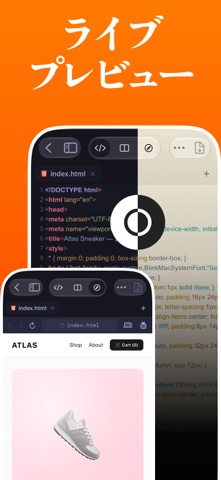
HTML クリエイター : 編集者と閲覧者 switched from a mixed to a light theme; moved to full-bleed screens without captions (was caption blocks laid over full-bleed screens); changed the accent colour from #6C340C to #F4A474; unified every screenshot on one background colour.
Aug 23, 2026
HTML クリエイター : 編集者と閲覧者 replaced the screenshot images (same count, theme and layout).

Screenshot style breakdown

Sampled from 5 of HTML クリエイター : 編集者と閲覧者's App Store screenshots — background, accent and theme, measured by LaunchShots (not something Apple publishes).

Use this style →
5 iPhone screenshots · 5 iPad Light theme One background colour across the set
#FC7C04 bg #DD6D03 #F4A474 accent #111111 text
vs. Developer Tools apps we've analysed (1203): 39% use a light theme — so does HTML クリエイター : 編集者と閲覧者; 33% put the caption above the phone — HTML クリエイター : 編集者と閲覧者 uses no captions; the average set has 5.5 screenshots. Full Developer Tools benchmark →

Screenshots

#1 HTML クリエイター : 編集者と閲覧者 iPhone screenshot 1
#2 HTML クリエイター : 編集者と閲覧者 iPhone screenshot 2
#3 HTML クリエイター : 編集者と閲覧者 iPhone screenshot 3
#4 HTML クリエイター : 編集者と閲覧者 iPhone screenshot 4
#5 HTML クリエイター : 編集者と閲覧者 iPhone screenshot 5

iPad screenshots

#1 HTML クリエイター : 編集者と閲覧者 iPad screenshot 1
#2 HTML クリエイター : 編集者と閲覧者 iPad screenshot 2
#3 HTML クリエイター : 編集者と閲覧者 iPad screenshot 3
#4 HTML クリエイター : 編集者と閲覧者 iPad screenshot 4
#5 HTML クリエイター : 編集者と閲覧者 iPad screenshot 5

Icon palette

extracting…
Dominant colors sampled from the icon — click any swatch to copy the hex.

About this app

HTML ビューアー & エディターは、iPhone および iPad 用の高速かつ軽量の HTML エディターであり、外出先で信頼性の高い Web 開発ツールを必要とする開発者向けに特別に構築されています。 強力な組み込み WebKit Web ビュー エンジンを使用して、リアルタイムで HTML を作成、編集、プレビューします。コードとプレビューを瞬時に切り替えて、アプリを離れることなくレイアウト、構造、マークアップをテストできます。 主な特長 - ライブHTMLプレビュー - 内蔵Webビューア - 構文強調表示コードエディター - 自動インデント - ダークとライトのテーマ - 複数のエディタテーマ - 複数のファイルの保存と管理 - 行番号 - 検索と置換 - カスタムフォントと調整可能なテキストサイズ - ツリービュー - HTML ファイルを作成、開き、管理する - 誰でも無料 ポータブル HTML エディターと Web プレビュー ツールを必要とするフロントエンド開発者、Web デザイナー、学生に最適です。 広告はありません。購読はありません。気を散らすものはありません。 iOS および i…

App details

Bundle ID
com.htmleditor.viewer
Latest version
2.0.0
Released
Feb 20, 2026
Last updated
Sep 23, 2026
Languages
32 (AR, CA, HR, CS, DA…)
Genres
開発ツール, 仕事効率化

What you can learn from HTML クリエイター : 編集者と閲覧者

Every shipping app on the App Store has gone through the same decisions you're working through right now: which screenshot goes first, what caption sits over it, which device frame to show, what color the background should be. The 10 screenshots above are HTML クリエイター : 編集者と閲覧者's answers to those questions — they're public, they're real, and they made it through Apple's review.

What the numbers say: HTML クリエイター : 編集者と閲覧者 runs a light set with one background colour (#FC7C04) carried across every screenshot — the listing reads as a single poster when the shots sit side by side in search results. The accent colour we picked up, #F4A474, is the one to reuse for badges, arrows and highlighted words if you borrow this look. Hit Use this style to open the editor with these exact colours and drop your own screenshot in.

Notice the first screenshot in particular. It's the one users see in search results and on the product page, and it's where most apps spend their best caption and tightest design. Look at the proportion of background to phone, where the text sits, what one thing the image is trying to communicate.

Want to see how other Developer Tools apps approach the same problem? Browse more Developer Tools apps in the showcase.

Take what works into your own screenshots

Open LaunchShots and design your App Store & Google Play screenshots — pick a device frame, drop captions, ship in minutes. Free, in your browser.

Open the screenshot editor →

Apps with a similar look

Closest background + accent colours among the listings we've analysed — useful when you want to see the same palette handled by a different team.

Credito Express: Préstamos ya
#FC7C04 #FCB46C
Mein Deal - Deals & Angebote
#FC7C04 #FCB46C
เด็กดี TCAS
#F47C04 #ECA464
DECAR Passageiro
#FC7C04 #FCAC5C
MDZ Go
#FC7C04 #FCBC7C
NouNou Shop
#FC7C04 #FCBC7C

More Developer Tools apps

Latest from the blog

ASO
Screenshot Mistakes That Quietly Cost Installs: 10 Fixes
Sep 23, 2026
Guides
Claude Code Weekly Limit vs 5-Hour Lockout: Complete Usage & Reset Guide
Sep 22, 2026
Guides
When Does Claude Code Usage Reset? Complete Reset Schedule Guide
Sep 22, 2026
News
Google Play Policy Updates: A Monthly Compliance Routine
Sep 22, 2026
1 / 1
copied