Chart position — tracked daily by LaunchShots
Screenshot style breakdown
Sampled from 5 of LITE Cleaner's App Store screenshots — background, accent and theme, measured by LaunchShots (not something Apple publishes).
#14C46C bg
#11AC5F
#FCD414 accent
#111111 text
Screenshots



Icon palette
About this app
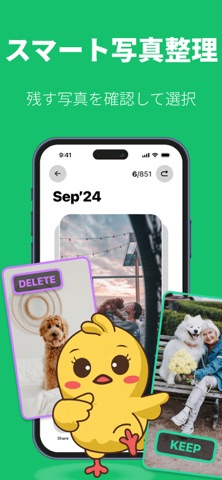
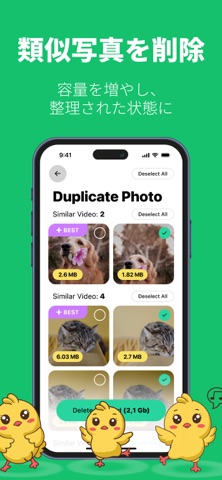
Lite Cleaner - Cleanup Photoは、数回のタップでデバイスの整理と空き容量確保を支援するスマート最適化ツールです。インテリジェントな分析とシンプルな操作を組み合わせ、ギャラリーをくまなく探さずに不要なファイルを素早く分類・確認・削除できます。直感的なオールインワンアシスタントでストレージをクリーンアップ、管理、効率化しましょう。 主な機能: - 大容量動画ファイルを削除してストレージを即時解放 - 画質を保ちつつ動画サイズを圧縮 - 重複写真や類似写真を自動検出・削除 - 不要なスクリーンショットを素早く一掃 - 古い/不要なカレンダーイベントを整理 - 連絡先管理:重複を統合、不完全/未使用項目を削除 - シンプルなジェスチャーで手動クリーンアップが可能なスワイプモード - Safari内蔵広告ブロッカー:閲覧中の広告・ポップアップ・追跡要素をブロック スマートな方法でストレージを管理しよう - Lite Cleaner - Cleanup Photo をインストールして、今日からよりクリーンで整理されたデバイスを体感してください。 サブスクリプション…
App details
What you can learn from LITE Cleaner
Every shipping app on the App Store has gone through the same decisions you're working through right now: which screenshot goes first, what caption sits over it, which device frame to show, what color the background should be. The 5 screenshots above are LITE Cleaner's answers to those questions — they're public, they're real, and they made it through Apple's review.
What the numbers say: LITE Cleaner runs a light set with one background colour (#14C46C) carried across every screenshot — the listing reads as a single poster when the shots sit side by side in search results. The accent colour we picked up, #FCD414, is the one to reuse for badges, arrows and highlighted words if you borrow this look. Hit Use this style to open the editor with these exact colours and drop your own screenshot in.
Notice the first screenshot in particular. It's the one users see in search results and on the product page, and it's where most apps spend their best caption and tightest design. Look at the proportion of background to phone, where the text sits, what one thing the image is trying to communicate.
Want to see how other Utilities apps approach the same problem? Browse more Utilities apps in the showcase.
Take what works into your own screenshots
Open LaunchShots and design your App Store & Google Play screenshots — pick a device frame, drop captions, ship in minutes. Free, in your browser.
Open the screenshot editor →Apps with a similar look
Closest background + accent colours among the listings we've analysed — useful when you want to see the same palette handled by a different team.