Screenshot style breakdown
Sampled from 3 of Piquee's App Store screenshots — background, accent and theme, measured by LaunchShots (not something Apple publishes).
#FCFCFC bg
#DDDDDD
#842C84 accent
#111111 text
Screenshots
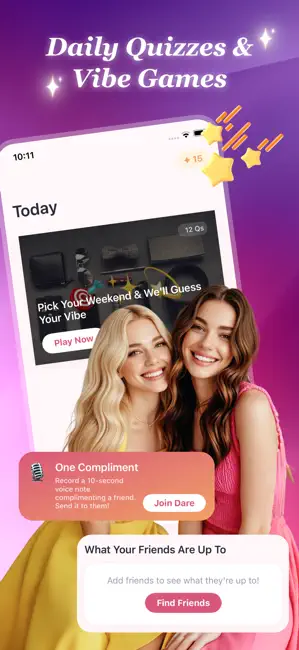
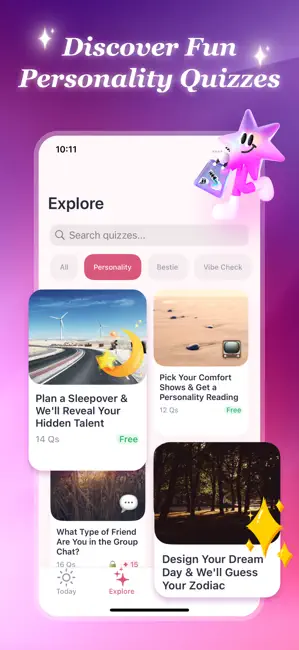
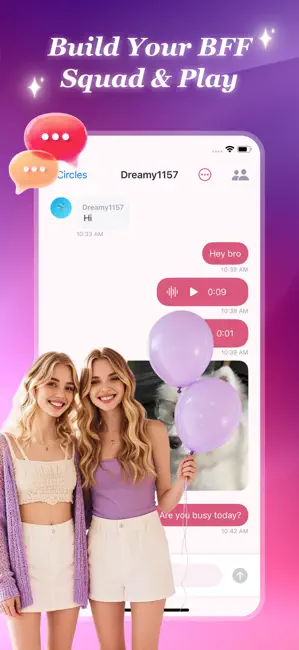
Icon palette
About this app
Piquee is a quiz and bestie-social app for young women. Here’s what you can do: • **Today** — A daily featured quiz and a dare (photo, voice, or this-or-that). Complete them and share to your circle. • **Explore** — Browse quizzes by category (Personality, Bestie, Vibe Check). Some are free, some unlock with Gems. Finish a quiz to get a result and earn a badge for your Passport. • **Circles** — Add friends by code, create private circles, and chat in the group. Share quiz results, send a “Cheer” on posts (spend Gems), or challenge a friend to a quiz PK. • **Passport** — Your profile: nickname, avatar, bio, friend code, stats (quizzes, dares, PK wins), and your badge collection. Sign in with Apple is the only login method; data is per-account. Gems are a consumable in-app currency used to unlock paid quizzes and to send Cheers; they can be purchased via IAP. Light, fun, and bui…
App details
What you can learn from Piquee
Every shipping app on the App Store has gone through the same decisions you're working through right now: which screenshot goes first, what caption sits over it, which device frame to show, what color the background should be. The 3 screenshots above are Piquee's answers to those questions — they're public, they're real, and they made it through Apple's review.
What the numbers say: Piquee runs a light set where the background shifts from screenshot to screenshot (first shot #FCFCFC) — each image has to stand on its own, so the captions carry more of the story. The accent colour we picked up, #842C84, is the one to reuse for badges, arrows and highlighted words if you borrow this look. Hit Use this style to open the editor with these exact colours and drop your own screenshot in.
Notice the first screenshot in particular. It's the one users see in search results and on the product page, and it's where most apps spend their best caption and tightest design. Look at the proportion of background to phone, where the text sits, what one thing the image is trying to communicate.
Want to see how other Entertainment apps approach the same problem? Browse more Entertainment apps in the showcase.
Take what works into your own screenshots
Open LaunchShots and design your App Store & Google Play screenshots — pick a device frame, drop captions, ship in minutes. Free, in your browser.
Open the screenshot editor →Apps with a similar look
Closest background + accent colours among the listings we've analysed — useful when you want to see the same palette handled by a different team.