Screenshot changes — detected by LaunchShots
Screenshot style breakdown
Sampled from 6 of Bonia: Trợ lý nghe điện thoại's App Store screenshots — background, accent and theme, measured by LaunchShots (not something Apple publishes).
#FCFCFC bg
#DDDDDD
#04A46C accent
#111111 text
Reading the caption text from the screenshots in your browser…
Screenshots





Icon palette
About this app
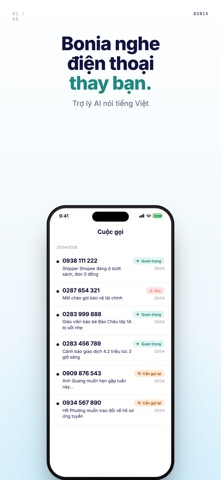
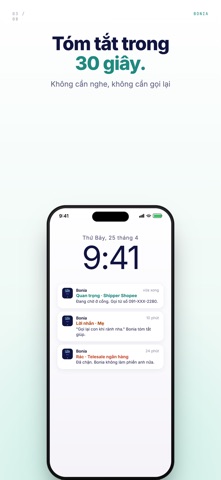
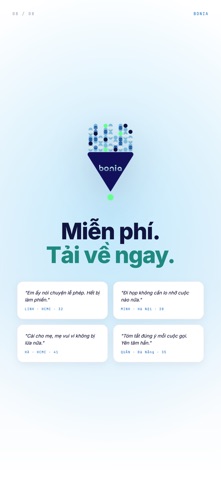
Bạn mệt vì cuộc gọi spam, lừa đảo, telesales mỗi ngày? Chặn hết số thì shipper, người thân, đối tác gọi không được? Giới thiệu Bonia: khi có cuộc gọi từ số lạ - bạn chỉ cần bấm từ chối, Bonia sẽ bắt máy và trò chuyện bằng tiếng Việt tự nhiên, ngắn gọn và tóm tắt lại nội dung cuộc gọi giúp bạn. Bạn sẽ không bao giờ bị làm phiền nữa, và vẫn không bỏ lỡ những cuộc gọi quan trọng từ shipper, khách hàng, đối tác... BONIA LÀM ĐƯỢC GÌ? • Nghe máy thay bạn bằng giọng nói tiếng Việt tự nhiên • Hiểu được người gọi đang muốn gì: shipper giao hàng, người thân hỏi thăm, telesale chào mời, lừa đảo giả danh ngân hàng, hay khẩn cấp cần xử lý ngay • Tự động phân loại: QUAN TRỌNG, CẦN GỌI LẠI, LỜI NHẮN, hay RÁC • Gửi thông báo kèm tóm tắt nội dung cuộc gọi để bạn quyết định • Lưu lịch sử cuộc gọi để bạn xem lại khi cần VÌ SAO CHỌN BONIA? • Luôn luôn miễn phí, không quảng cáo, không thu thập dữ liệu tr…
App details
What you can learn from Bonia: Trợ lý nghe điện thoại
Every shipping app on the App Store has gone through the same decisions you're working through right now: which screenshot goes first, what caption sits over it, which device frame to show, what color the background should be. The 8 screenshots above are Bonia: Trợ lý nghe điện thoại's answers to those questions — they're public, they're real, and they made it through Apple's review.
What the numbers say: Bonia: Trợ lý nghe điện thoại runs a light set with one background colour (#FCFCFC) carried across every screenshot — the listing reads as a single poster when the shots sit side by side in search results. The accent colour we picked up, #04A46C, is the one to reuse for badges, arrows and highlighted words if you borrow this look. Hit Use this style to open the editor with these exact colours and drop your own screenshot in.
Notice the first screenshot in particular. It's the one users see in search results and on the product page, and it's where most apps spend their best caption and tightest design. Look at the proportion of background to phone, where the text sits, what one thing the image is trying to communicate.
Want to see how other Productivity apps approach the same problem? Browse more Productivity apps in the showcase.
Take what works into your own screenshots
Open LaunchShots and design your App Store & Google Play screenshots — pick a device frame, drop captions, ship in minutes. Free, in your browser.
Open the screenshot editor →Apps with a similar look
Closest background + accent colours among the listings we've analysed — useful when you want to see the same palette handled by a different team.