Chart position — tracked daily by LaunchShots
Screenshot style breakdown
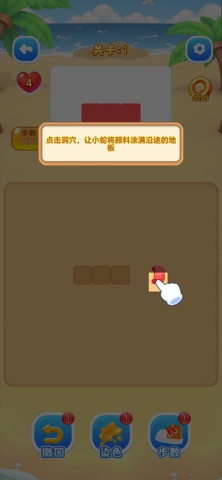
Sampled from 4 of 万箭归宗:蛇影迷阵's App Store screenshots — background, accent and theme, measured by LaunchShots (not something Apple publishes).
#6C5C3C bg
#807257
#D4945C accent
#FFFFFF text
Screenshots



Icon palette
About this app
在染色模式中发射彩色小蛇直线冲锋,将网格染成目标图案,石头阻挡与三角转弯让每一步都充满策略;在铺路模式中拖拽方块搭建连续路径,引导多色小蛇并行归洞,传送门助你绝境翻盘。游戏搭配灵动的小蛇游走与染色扩散动画,海量关卡层层递进,适合热爱解谜、喜欢挑战脑力的你
App details
What you can learn from 万箭归宗:蛇影迷阵
Every shipping app on the App Store has gone through the same decisions you're working through right now: which screenshot goes first, what caption sits over it, which device frame to show, what color the background should be. The 4 screenshots above are 万箭归宗:蛇影迷阵's answers to those questions — they're public, they're real, and they made it through Apple's review.
What the numbers say: 万箭归宗:蛇影迷阵 runs a mixed light-and-dark set where the background shifts from screenshot to screenshot (first shot #6C5C3C) — each image has to stand on its own, so the captions carry more of the story. The accent colour we picked up, #D4945C, is the one to reuse for badges, arrows and highlighted words if you borrow this look. Hit Use this style to open the editor with these exact colours and drop your own screenshot in.
Notice the first screenshot in particular. It's the one users see in search results and on the product page, and it's where most apps spend their best caption and tightest design. Look at the proportion of background to phone, where the text sits, what one thing the image is trying to communicate.
Want to see how other Games apps approach the same problem? Browse more Games apps in the showcase.
Take what works into your own screenshots
Open LaunchShots and design your App Store & Google Play screenshots — pick a device frame, drop captions, ship in minutes. Free, in your browser.
Open the screenshot editor →Apps with a similar look
Closest background + accent colours among the listings we've analysed — useful when you want to see the same palette handled by a different team.