Chart position — tracked daily by LaunchShots
Screenshot style breakdown
Sampled from 5 of GridOne - F1赛程与小组件's App Store screenshots — background, accent and theme, measured by LaunchShots (not something Apple publishes).
#0C0C0C bg
#2E2E2E
#844404 accent
#FFFFFF text
- #3比赛 数据 策略 清晰 呈现
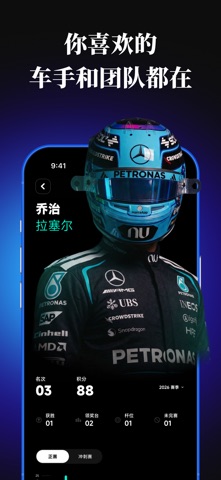
- #4你 喜欢 的 车 手 和 国 队 都 在
- #5比赛 日
Captions read from the screenshots (OCR, may contain small errors): 3 headlines, 5.7 words on average (longest 10).
Screenshots



Icon palette
About this app
GridOne,为 F1 车迷打造的观赛助手。 赛前掌握赛程与天气,赛中追踪实时赛况与赛道动态,赛后查看车手、车队与积分变化。 【观赛第二屏】 实时赛况:比赛进行时,在 GridOne 获取关键赛事信息,让转播之外的重要动态也尽在掌握。 3D 赛道:从另一种视角观察比赛进程与赛道动态,让观赛更加直观。 比赛周天气:提前了解比赛周末天气变化,为每一场练习赛、排位赛和正赛做好准备。 锁屏观赛:无需反复打开 App,在锁屏上快速获取比赛相关信息。 【完整赛季】 全年赛程:查看整个赛季的大奖赛安排,提前规划每一个比赛周末。 赛事数据:查看每场比赛的重要数据与赛事信息。 车手与车队:了解车手和车队信息,持续关注他们整个赛季的表现。 积分与排名:查看车手积分榜、车队积分榜以及赛季积分变化。 【属于车迷的小组件】 把你喜欢的 F1 内容放到桌面和锁屏。 • 比赛日程 • 下一场比赛倒计时 • 喜爱的车手 • 喜爱的车队 • 车手积分榜 • 车队积分榜 • 个性化主题 更多小组件和观赛功能持续更新中。 【赛事提醒】 根据自己的观赛习惯开启通知。 比赛周…
App details
What you can learn from GridOne - F1赛程与小组件
Every shipping app on the App Store has gone through the same decisions you're working through right now: which screenshot goes first, what caption sits over it, which device frame to show, what color the background should be. The 5 screenshots above are GridOne - F1赛程与小组件's answers to those questions — they're public, they're real, and they made it through Apple's review.
What the numbers say: GridOne - F1赛程与小组件 runs a dark set with one background colour (#0C0C0C) carried across every screenshot — the listing reads as a single poster when the shots sit side by side in search results. The accent colour we picked up, #844404, is the one to reuse for badges, arrows and highlighted words if you borrow this look. Hit Use this style to open the editor with these exact colours and drop your own screenshot in.
Notice the first screenshot in particular. It's the one users see in search results and on the product page, and it's where most apps spend their best caption and tightest design. Look at the proportion of background to phone, where the text sits, what one thing the image is trying to communicate.
Want to see how other Sports apps approach the same problem? Browse more Sports apps in the showcase.
Take what works into your own screenshots
Open LaunchShots and design your App Store & Google Play screenshots — pick a device frame, drop captions, ship in minutes. Free, in your browser.
Open the screenshot editor →Apps with a similar look
Closest background + accent colours among the listings we've analysed — useful when you want to see the same palette handled by a different team.