Screenshot style breakdown
Sampled from 4 of Foudre : Radar & Alertes's App Store screenshots — background, accent and theme, measured by LaunchShots (not something Apple publishes).
#141C34 bg
#343B50
#0CDCFC accent
#FFFFFF text
Screenshots
Icon palette
About this app
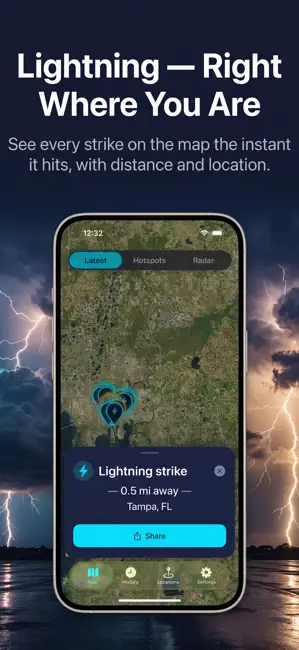
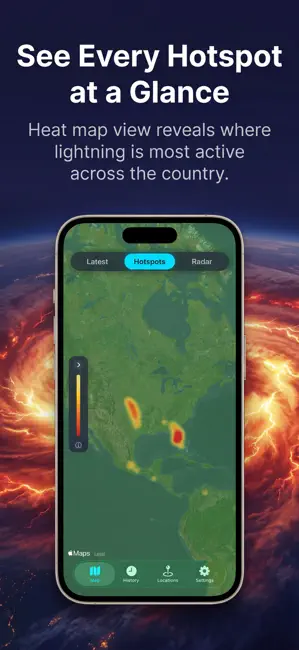
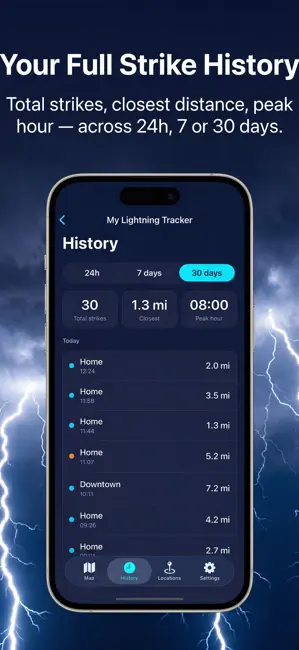
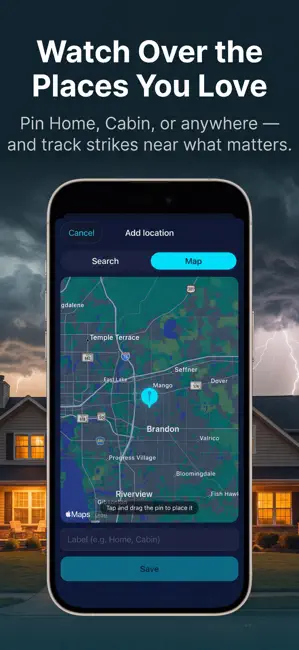
Sachez quand la foudre va frapper — avant qu'elle ne le fasse. Chaque éclair qui touche le sol près de vous apparaît instantanément sur la carte : où il est tombé, à quelle distance et l'intensité du signal. Appuyez sur un impact pour tous les détails : horodatage, distance et lieu le plus proche. TROIS VUES POUR TOUT VOIR • Dernières frappes — les impacts en direct se mettent à jour au fil des orages • Hotspots — une carte thermique des zones les plus actives du pays • Radar — superposez les mouvements des tempêtes sur la même carte VOS LIEUX PRÉFÉRÉS, SOUS SURVEILLANCE Ajoutez des lieux nommés — Maison, Chalet, Bureau — en posant une épingle ou en faisant une recherche. Chaque impact dans votre Historique est automatiquement rattaché à ces endroits. Pratique pour garder un œil sur ce qui compte vraiment ! L'HISTORIQUE D'UN COUP D'ŒIL Basculez entre les fenêtres 24h, 7 jours et 30 …
App details
What you can learn from Foudre : Radar & Alertes
Every shipping app on the App Store has gone through the same decisions you're working through right now: which screenshot goes first, what caption sits over it, which device frame to show, what color the background should be. The 4 screenshots above are Foudre : Radar & Alertes's answers to those questions — they're public, they're real, and they made it through Apple's review.
What the numbers say: Foudre : Radar & Alertes runs a dark set with one background colour (#141C34) carried across every screenshot — the listing reads as a single poster when the shots sit side by side in search results. The accent colour we picked up, #0CDCFC, is the one to reuse for badges, arrows and highlighted words if you borrow this look. Hit Use this style to open the editor with these exact colours and drop your own screenshot in.
Notice the first screenshot in particular. It's the one users see in search results and on the product page, and it's where most apps spend their best caption and tightest design. Look at the proportion of background to phone, where the text sits, what one thing the image is trying to communicate.
Want to see how other Weather apps approach the same problem? Browse more Weather apps in the showcase.
Take what works into your own screenshots
Open LaunchShots and design your App Store & Google Play screenshots — pick a device frame, drop captions, ship in minutes. Free, in your browser.
Open the screenshot editor →Apps with a similar look
Closest background + accent colours among the listings we've analysed — useful when you want to see the same palette handled by a different team.