Chart position — tracked daily by LaunchShots
Screenshot style breakdown
Sampled from 4 of SuitFlow Focus's App Store screenshots — background, accent and theme, measured by LaunchShots (not something Apple publishes).
#1C1C24 bg
#3B3B42
#CC7C94 accent
#FFFFFF text
Screenshots


Icon palette
About this app
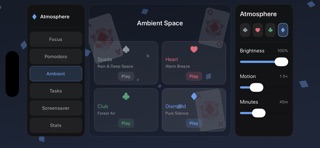
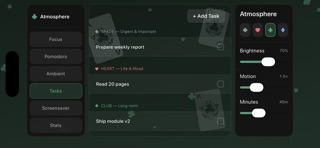
SuitFlow Focus is a landscape-oriented, immersive poker-themed focus tool that uses four poker suits—Spades, Hearts, Clubs, and Diamonds—as visual and emotional anchors to create four distinct focus spaces. Six Core Functions to meet your focus needs throughout the day: - Focus Timer: Large countdown timer with a decorative progress ring; switching suits changes the atmosphere mode—Spades for deep focus, Hearts for easy learning, Clubs for work, and Diamonds for a lightning-fast rush. - Pomodoro Timer: Optimized landscape layout with a dotted visual representation of progress, suitable for extended use. - Ambient Soundscapes: Four unique, purely coded sound effects corresponding to the four suits—Rainy Night, Gentle Breeze, Forest Air, and Pure Silence. - Task Board: Four-quadrant card layout, corresponding to task attributes by suit, supporting completion marking and archiving. -…
App details
What you can learn from SuitFlow Focus
Every shipping app on the App Store has gone through the same decisions you're working through right now: which screenshot goes first, what caption sits over it, which device frame to show, what color the background should be. The 4 screenshots above are SuitFlow Focus's answers to those questions — they're public, they're real, and they made it through Apple's review.
What the numbers say: SuitFlow Focus runs a dark set with one background colour (#1C1C24) carried across every screenshot — the listing reads as a single poster when the shots sit side by side in search results. The accent colour we picked up, #CC7C94, is the one to reuse for badges, arrows and highlighted words if you borrow this look. Hit Use this style to open the editor with these exact colours and drop your own screenshot in.
Notice the first screenshot in particular. It's the one users see in search results and on the product page, and it's where most apps spend their best caption and tightest design. Look at the proportion of background to phone, where the text sits, what one thing the image is trying to communicate.
Want to see how other Navigation apps approach the same problem? Browse more Navigation apps in the showcase.
Take what works into your own screenshots
Open LaunchShots and design your App Store & Google Play screenshots — pick a device frame, drop captions, ship in minutes. Free, in your browser.
Open the screenshot editor →Apps with a similar look
Closest background + accent colours among the listings we've analysed — useful when you want to see the same palette handled by a different team.