Screenshot changes — detected by LaunchShots
Screenshot style breakdown
Sampled from 6 of Nlog - 不妊治療記録's App Store screenshots — background, accent and theme, measured by LaunchShots (not something Apple publishes).
#ECFCFC bg
#CFDDDD
#74ACF4 accent
#111111 text
Reading the caption text from the screenshots in your browser…
Screenshots


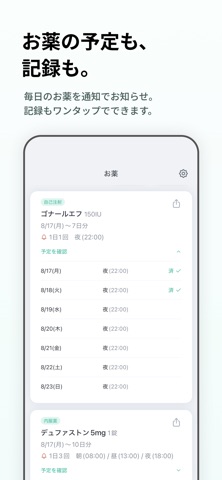

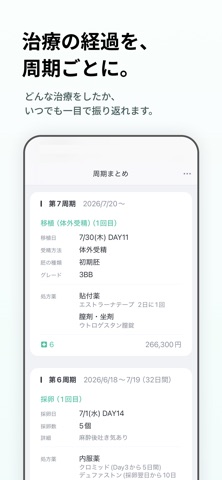

Icon palette
About this app
〜不妊治療をはじめたら、Nlogで記録をはじめませんか〜 [こんな方におすすめ] ・クリニックでの通院内容を記録したい ・お薬の記録・飲み忘れを防ぎたい ・支払ったお金・受け取ったお金・実質負担を把握したい ・パートナーへの共有を楽にしたい ・シンプルで続けやすい記録アプリを探している [Nlogでできること] ・不妊治療に特化したフォーマットで、かんたんに通院を記録できます。 ・記録をLINEで共有でき、口頭で説明する大変さを和らげます。 ・毎日のお薬を通知でお知らせ。記録もワンタップでできます。 ・費用は月ごと・周期ごとに自動集計。夫婦間での精算にも役立ちます。 ・周期ごとに、どんな治療を受したかいつでも一目で振り返れます。 [ユーザーの声(抜粋)] ・通院、薬、お金の管理も一括で管理できて、シンプルで見やすい。ほんとに求めてたアプリです! ・サクッと操作できるのがとてもストレスフリーで驚きました! ・気分の上下や体調で、記録を残すのが億劫でしたがおかげさまで気軽に記録できるようになりました。 ・ DAYのカウントや、…
App details
What you can learn from Nlog - 不妊治療記録
Every shipping app on the App Store has gone through the same decisions you're working through right now: which screenshot goes first, what caption sits over it, which device frame to show, what color the background should be. The 7 screenshots above are Nlog - 不妊治療記録's answers to those questions — they're public, they're real, and they made it through Apple's review.
What the numbers say: Nlog - 不妊治療記録 runs a light set with one background colour (#ECFCFC) carried across every screenshot — the listing reads as a single poster when the shots sit side by side in search results. The accent colour we picked up, #74ACF4, is the one to reuse for badges, arrows and highlighted words if you borrow this look. Hit Use this style to open the editor with these exact colours and drop your own screenshot in.
Notice the first screenshot in particular. It's the one users see in search results and on the product page, and it's where most apps spend their best caption and tightest design. Look at the proportion of background to phone, where the text sits, what one thing the image is trying to communicate.
Want to see how other Medical apps approach the same problem? Browse more Medical apps in the showcase.
Take what works into your own screenshots
Open LaunchShots and design your App Store & Google Play screenshots — pick a device frame, drop captions, ship in minutes. Free, in your browser.
Open the screenshot editor →Apps with a similar look
Closest background + accent colours among the listings we've analysed — useful when you want to see the same palette handled by a different team.