Chart position — tracked daily by LaunchShots
Screenshot style breakdown
Sampled from 6 of خرايم's App Store screenshots — background, accent and theme, measured by LaunchShots (not something Apple publishes).
#040404 bg
#272727
#AC744C accent
#FFFFFF text
Reading the caption text from the screenshots in your browser…
Screenshots


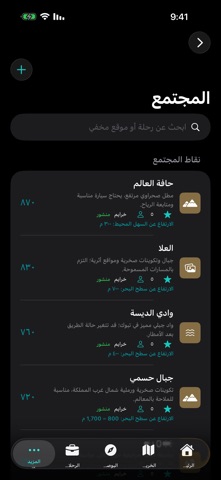


iPad screenshots

Icon palette
About this app
خرايم - رفيقك في البر. تطبيق ملاحة برية عربي مصمم للكشتات والرحلات الصحراوية، يجمع ما يحتاجه الرحال في مكان واحد ويعمل حتى مع ضعف الاتصال. البوصلة الميدانية: بوصلة بقرص دوار يشير إلى الشمال الحقيقي، مع مؤشرات للوجهة والرياح واتجاه الحركة، وعرض دقة الاتجاه ومعايرة الحساس. خرائط العجاجي فوق القمر الصناعي: اعرض خرائط العجاجي الورقية كطبقة شفافة فوق صور القمر الصناعي مع تحكم كامل بالشفافية، أو تصفحها بالعرض المسطح. تتضمن خريطة المملكة، وسط وشرق المملكة، ومدينة الرياض. قاعدة معالم ضخمة: أكثر من 27,000 معلم وموقع طبيعي سعودي، تشمل الأودية والجبال والتلال والكثبان والحرات والآبار والعيون والقرى والمدن والمعالم. ابحث بالاسم واعرض الإحداثيات والارتفاع ونوع التضاريس. تعمل بلا إنترنت. معلومات جغرافية موثقة: بطاقات معلومات للمعالم الشهيرة مثل السودة، جبل طويق، وادي الرمة، حرة رهط وغيرها، بارتفاعاتها وأطوالها ومساحاتها من مصادر مسماة، مع الإحداثيات بصيغتين عشرية ودرجات/دقائق/ثواني. إدارة الرحل…
App details
What you can learn from خرايم
Every shipping app on the App Store has gone through the same decisions you're working through right now: which screenshot goes first, what caption sits over it, which device frame to show, what color the background should be. The 7 screenshots above are خرايم's answers to those questions — they're public, they're real, and they made it through Apple's review.
What the numbers say: خرايم runs a dark set with one background colour (#040404) carried across every screenshot — the listing reads as a single poster when the shots sit side by side in search results. The accent colour we picked up, #AC744C, is the one to reuse for badges, arrows and highlighted words if you borrow this look. Hit Use this style to open the editor with these exact colours and drop your own screenshot in.
Notice the first screenshot in particular. It's the one users see in search results and on the product page, and it's where most apps spend their best caption and tightest design. Look at the proportion of background to phone, where the text sits, what one thing the image is trying to communicate.
Want to see how other Navigation apps approach the same problem? Browse more Navigation apps in the showcase.
Take what works into your own screenshots
Open LaunchShots and design your App Store & Google Play screenshots — pick a device frame, drop captions, ship in minutes. Free, in your browser.
Open the screenshot editor →Apps with a similar look
Closest background + accent colours among the listings we've analysed — useful when you want to see the same palette handled by a different team.