Chart position — tracked daily by LaunchShots
Screenshot style breakdown
Sampled from 5 of Akademia Robotyki's App Store screenshots — background, accent and theme, measured by LaunchShots (not something Apple publishes).
#FCFCFC bg
#DDDDDD
#340C84 accent
#111111 text
Screenshots



Icon palette
About this app
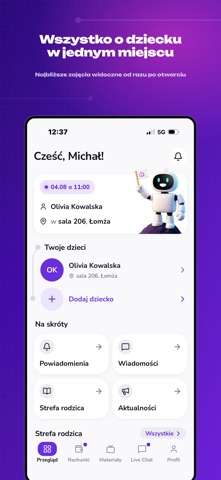
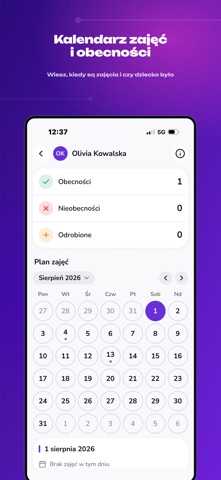
Aplikacja jest dla rodziców dzieci zapisanych na nasze zajęcia z robotyki. Konto działa na numerze telefonu podanym przy zapisie dziecka — nie ma otwartej rejestracji, nie ma treści dostępnych bez logowania i nie ma kont anonimowych. Kiedy dziecko ma zajęcia Dzień, godzina, sala i prowadzący widoczne od razu po otwarciu aplikacji. Do tego kalendarz na cały miesiąc i listy zajęć nadchodzących oraz zakończonych, żeby cofnąć się do dowolnego terminu w sezonie. Czy było na zajęciach Obecność odznaczana jeszcze na sali, więc masz ją przy konkretnym terminie tego samego dnia. Bez dopytywania i bez czekania na koniec miesiąca. Co dziecko zbudowało Zdjęcia i filmy prosto z pracowni: gotowe konstrukcje, przebieg wyzwania, moment, w którym robot wreszcie ruszył. Relacje z zajęć widzą wyłącznie rodzice dzieci z tej samej grupy, po zalogowaniu — nic nie jest publiczne i nic nie trafia poza…
App details
What you can learn from Akademia Robotyki
Every shipping app on the App Store has gone through the same decisions you're working through right now: which screenshot goes first, what caption sits over it, which device frame to show, what color the background should be. The 5 screenshots above are Akademia Robotyki's answers to those questions — they're public, they're real, and they made it through Apple's review.
What the numbers say: Akademia Robotyki runs a light set with one background colour (#FCFCFC) carried across every screenshot — the listing reads as a single poster when the shots sit side by side in search results. The accent colour we picked up, #340C84, is the one to reuse for badges, arrows and highlighted words if you borrow this look. Hit Use this style to open the editor with these exact colours and drop your own screenshot in.
Notice the first screenshot in particular. It's the one users see in search results and on the product page, and it's where most apps spend their best caption and tightest design. Look at the proportion of background to phone, where the text sits, what one thing the image is trying to communicate.
Want to see how other Education apps approach the same problem? Browse more Education apps in the showcase.
Take what works into your own screenshots
Open LaunchShots and design your App Store & Google Play screenshots — pick a device frame, drop captions, ship in minutes. Free, in your browser.
Open the screenshot editor →Apps with a similar look
Closest background + accent colours among the listings we've analysed — useful when you want to see the same palette handled by a different team.