Chart position — tracked daily by LaunchShots
Screenshot style breakdown
Sampled from 6 of LawLoop: ฟังและค้นกฎหมาย's App Store screenshots — background, accent and theme, measured by LaunchShots (not something Apple publishes).
#042424 bg
#274242
#C49C5C accent
#FFFFFF text
Screenshots




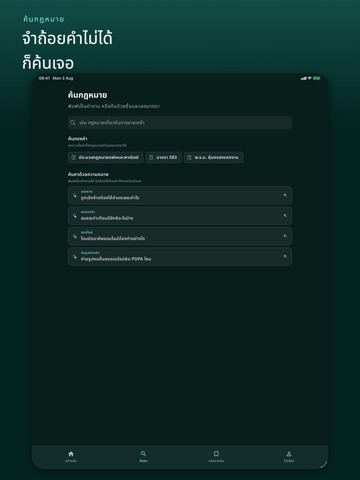
iPad screenshots



Icon palette
About this app
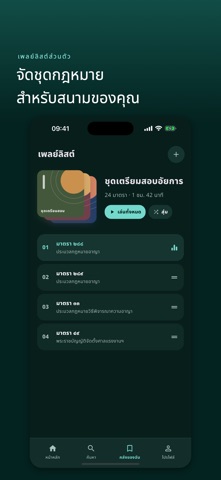
กฎหมายมีรายละเอียดมาก แต่การทบทวนไม่จำเป็นต้องอยู่แค่บนหน้ากระดาษ LawLoop ช่วยให้คุณค้น อ่าน และฟังกฎหมายไทยทีละมาตราได้ต่อเนื่อง เหมือนเปิดเพลงหรือพอดแคสต์ เหมาะสำหรับนักศึกษา ผู้เตรียมสอบ ผู้ทำงานด้านกฎหมาย และทุกคนที่ต้องการกลับมาทบทวนตัวบทบ่อย ๆ ฟังกฎหมายในจังหวะของคุณ • เปิดฟังตัวบทกฎหมายด้วยเสียงอ่าน AI • ปรับความเร็ว หยุด เล่นต่อ และข้ามไปมาตราถัดไป • ฟังต่อขณะล็อกหน้าจอหรือใช้งานแอปอื่น • ดาวน์โหลดเสียงที่พร้อมแล้วไว้ฟังแบบออฟไลน์ ค้นหาโดยไม่ต้องจำชื่อเต็ม • ค้นจากชื่อกฎหมาย เลขมาตรา หรือถ้อยคำในตัวบท • ค้นหาด้วยความหมายเพื่อพบเรื่องที่เกี่ยวข้อง • ดูว่าผลลัพธ์อยู่ในกฎหมายฉบับใดและเปิดเอกสารต้นฉบับเพื่อตรวจสอบได้ สร้างชุดทบทวนของตัวเอง • จัดมาตราที่ต้องการไว้ในเพลย์ลิสต์ • บันทึกกฎหมายกลับมาอ่านหรือฟังภายหลัง • ติดตามตำแหน่งและประวัติการฟัง ฝึกด้วยเสียงของคุณเอง • เปิดตัวบทที่จัดย่อหน้าให้อ่านง่ายขณะอัดเสียง • บันทึกเสียงแยกรายมาตรา • กลับมาฟัง เปรียบเทียบ หรืออัดใหม่ได้ทุก…
App details
What you can learn from LawLoop: ฟังและค้นกฎหมาย
Every shipping app on the App Store has gone through the same decisions you're working through right now: which screenshot goes first, what caption sits over it, which device frame to show, what color the background should be. The 20 screenshots above are LawLoop: ฟังและค้นกฎหมาย's answers to those questions — they're public, they're real, and they made it through Apple's review.
What the numbers say: LawLoop: ฟังและค้นกฎหมาย runs a dark set with one background colour (#042424) carried across every screenshot — the listing reads as a single poster when the shots sit side by side in search results. The accent colour we picked up, #C49C5C, is the one to reuse for badges, arrows and highlighted words if you borrow this look. Hit Use this style to open the editor with these exact colours and drop your own screenshot in.
Notice the first screenshot in particular. It's the one users see in search results and on the product page, and it's where most apps spend their best caption and tightest design. Look at the proportion of background to phone, where the text sits, what one thing the image is trying to communicate.
Want to see how other Education apps approach the same problem? Browse more Education apps in the showcase.
Take what works into your own screenshots
Open LaunchShots and design your App Store & Google Play screenshots — pick a device frame, drop captions, ship in minutes. Free, in your browser.
Open the screenshot editor →Apps with a similar look
Closest background + accent colours among the listings we've analysed — useful when you want to see the same palette handled by a different team.