Chart position — tracked daily by LaunchShots
Screenshot style breakdown
Sampled from 6 of いつでも英語脳's App Store screenshots — background, accent and theme, measured by LaunchShots (not something Apple publishes).
#F4F4F4 bg
#D6D6D6
#3474BC accent
#111111 text
Reading the caption text from the screenshots in your browser…
Screenshots


Icon palette
About this app
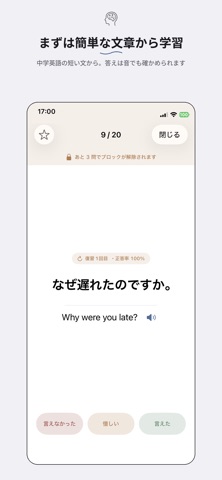
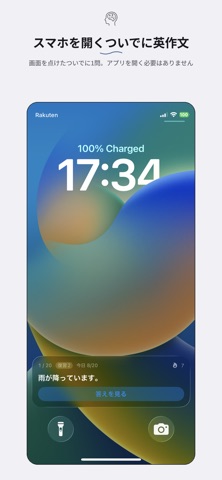
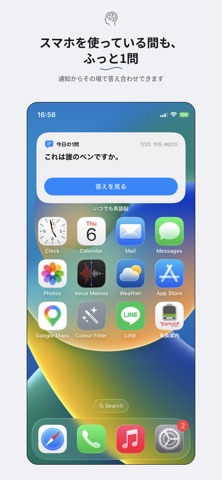
英語学習が続かないのは、やる気の問題ではありません。 思い出す機会が、生活の中に足りないだけです。 「いつでも英語脳」は、日本語の文を見て英語で言ってみる、 シンプルな英作文アプリです。 ほかと違うのは、学習の中身ではなく置き場所を設計していることです。 ■ アプリを開かなくても、1問だけ解ける 1日5分の学習時間を作るのは大変ですが、 1問だけなら10秒で終わります。 その10秒を、生活の中に何度も置きました。 ・ロック画面 画面を点けるたびに、問題が目に入ります。 Face ID で解除したあと、その場で答え合わせと自己採点までできます。 ・ホーム画面ウィジェット 中サイズと大サイズのウィジェットの中で、 問題を読み、答えを見て、採点するところまで完結します。 ・通知 設定した間隔で、日本語の文が通知に届きます。 タップしなくても、読んだ時点で頭の中で英作文できます。 通知を出す時間帯は自分で決められます。就寝中には鳴りません。 どこで解いても進み具合は共有されます。 ホーム画面で3問解いたあとロッ…
App details
What you can learn from いつでも英語脳
Every shipping app on the App Store has gone through the same decisions you're working through right now: which screenshot goes first, what caption sits over it, which device frame to show, what color the background should be. The 7 screenshots above are いつでも英語脳's answers to those questions — they're public, they're real, and they made it through Apple's review.
What the numbers say: いつでも英語脳 runs a light set with one background colour (#F4F4F4) carried across every screenshot — the listing reads as a single poster when the shots sit side by side in search results. The accent colour we picked up, #3474BC, is the one to reuse for badges, arrows and highlighted words if you borrow this look. Hit Use this style to open the editor with these exact colours and drop your own screenshot in.
Notice the first screenshot in particular. It's the one users see in search results and on the product page, and it's where most apps spend their best caption and tightest design. Look at the proportion of background to phone, where the text sits, what one thing the image is trying to communicate.
Want to see how other Education apps approach the same problem? Browse more Education apps in the showcase.
Take what works into your own screenshots
Open LaunchShots and design your App Store & Google Play screenshots — pick a device frame, drop captions, ship in minutes. Free, in your browser.
Open the screenshot editor →Apps with a similar look
Closest background + accent colours among the listings we've analysed — useful when you want to see the same palette handled by a different team.